Your first hour, one issue from start to discussion.
By the end of this hour, you should be able to explain one issue, its supporting record and who should be involved. That is the whole first journey. The rest of the product builds on it. The steps have no timer. Take them at your own pace.
Before you start
Sign in, then open Account menu to check your account, organisation and role. What you see depends on your role. Some pages are limited by role, and Administration is shown to operators only. If a page you expected is missing, your account may not have access to it. Ask your operator.
The examples in this page and in the screenshots come from Meridian GridMeridian GridThe fictional demonstration organisation used by the demonstration walk and its sample data. Nothing about Meridian Grid describes a real company., a fictional demonstration organisation. Your own organisation’s records will differ.
The first journey
There are five steps.
- Choose your organisation. Confirm the organisation at the top of the page, so that every page you open shows the same records.
- Open the Overview. It selects a short set of items to review first. Pick one that matters to your work, read why it was raised, and note who is named. Select Show all to see the rest. The selection follows fixed rules. It is not a ranking of business risk, and an empty Overview means none of those rules matched. It does not mean nothing needs attention.
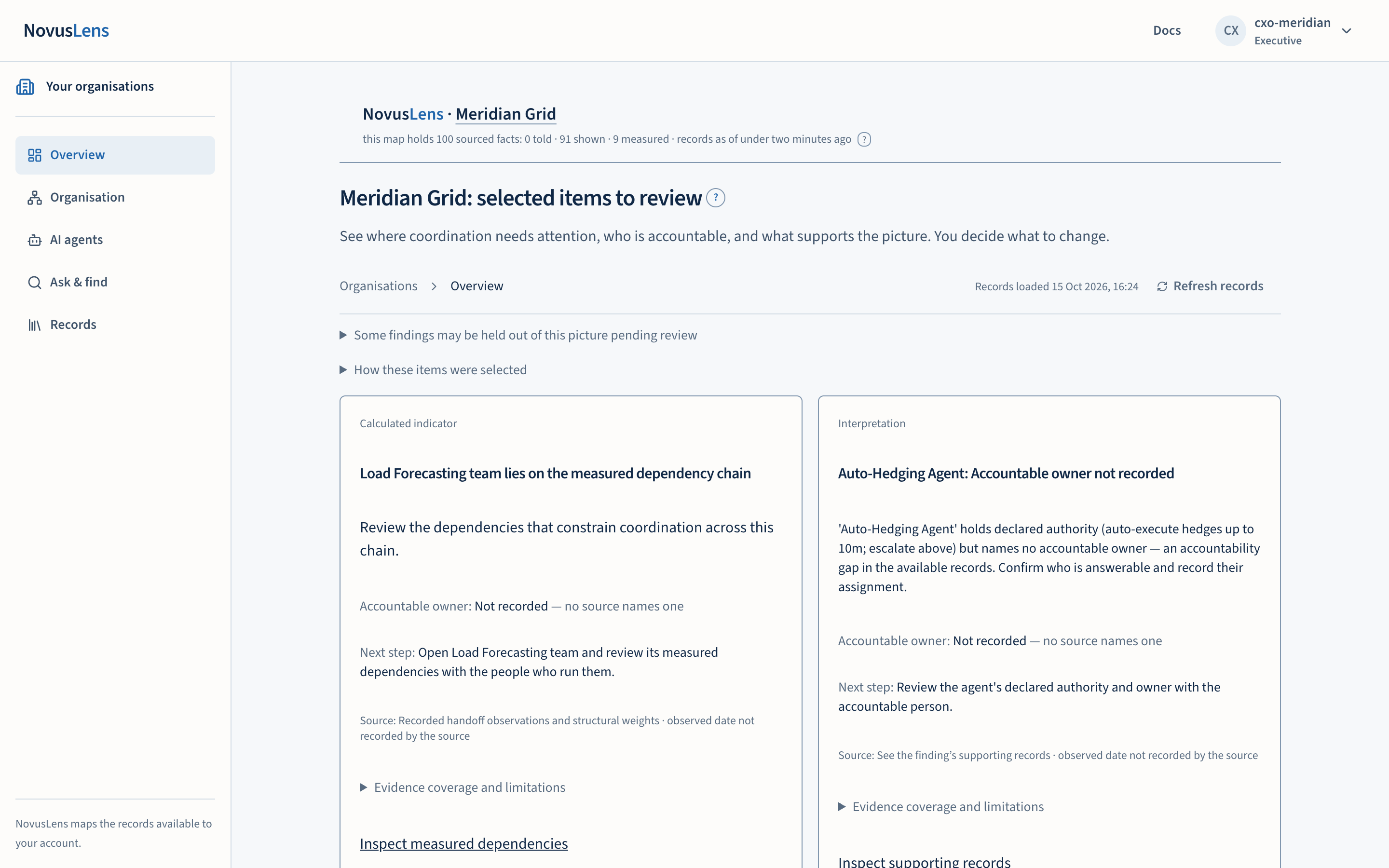
- Open the item’s evidence. Each item is labelled by how it is known: told, shown or measured. Check the date, and check whether the sources disagree with each other. A label is not a guarantee that the item is accurate. It tells you what kind of support stands behind it.
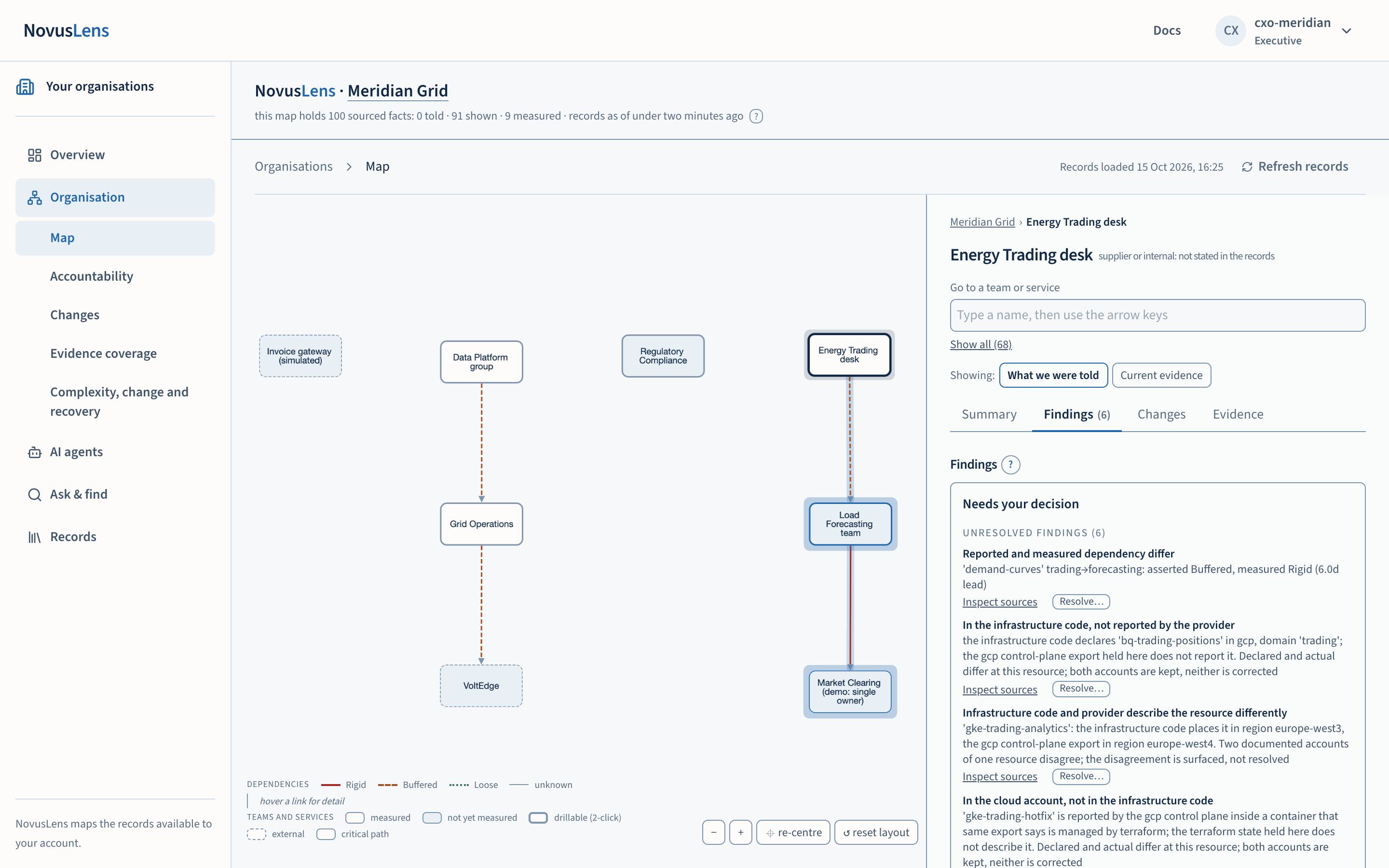
- Find the owner. Under Organisation, open the MapMapThe view of teams, services and their dependencies for the selected part of the organisation. Details appear beside the map. or the Accountability view and select the team. Its Summary names the owner. If no name is shown, nobody is recorded for that team. Ask the team to confirm who is answerable.
- Take it to a discussion. Under Records, export a management brief. Check its date, its scopeScopeThe work, data, activity or access that a rule, statement or calculation covers. For access, it names the records an account can see. For team measures, “Own operations” covers the selected unit. “Including descendants” adds the units beneath it. and its limitations before you share it. Links to source records still need the recipient’s own access.
Ask a question
In Ask & find, use Find to locate a source. Use Ask for a factual question, such as who is accountable for outage reporting. Choose the whole organisation or one team before you ask. Each statement in an answer is numbered, and each number points to the record it rests on.
For a question about trade-offs, choose A strategic question instead. A generated answer is not an approved decision. Treat it as a starting point for the people responsible.
Explore a change
Explore a change lets you alter one dependencyDependencyA link where one unit needs something from another. A dependency is not a reporting line: it shows where work relies on something else. assumption and compare the result. The screen calls the figure the dependency-chain index. These docs call it critical path lengthCPLCritical path length. The total coordination weight of the longest chain of dependencies in the model. NovusLens reports it as index points, not elapsed time. (CPL): the total weight of the longest chain of dependencies. A lower total is a change in the model. It is not hours saved and not money saved. Review the trade-off with the teams involved before you draw a conclusion. The CPL concept page explains how the total is built, with a worked example.
Look behind a Complexity, Agility and Recoverability score
Complexity, Agility and RecoverabilityRecoverabilityThe R in C/A/R: how well a team or service restores acceptable service after a failure. Recovery times and tested alternatives can supply evidence. (C/A/RC/A/RThree separate scores for a team or service: Complexity, Agility and Recoverability. Each uses current evidence and the customer’s stated scoring rules.) are three measures of the current structure of a team or service. Complexity concerns structure and dependencies. Agility is the ability to change. Recoverability is the ability to restore service after a disruption. The C/A/R concept page explains each measure in full.
Open How these are assessed, with sources to see the agreed calculation rule, the sources behind it, and which direction is favourable. A score of 60 has no universal meaning. It is calibrated locally.
Choose a team and its scope: its own operations, or the teams beneath it as well. A parent’s figures are calculated from the records in that scope. They are not an average of its children’s scores. A supplier can reduce internal complexity while creating a dependency that is hard to replace, so read the scores together.
Two questions about AI agents
Open AI agents and ask two questions about each agent. What is it permitted to do? What do the records show that it did?
A remitRemitA written list of an agent’s allowed actions, resources and destinations for information. The list states whether it is complete. is the written limit on what an agent may do. Remit driftRemit driftReported agent activity that breaks a recorded exclusion or falls outside a list declared complete. An incomplete list alone does not prove that activity is forbidden. means that recorded activity broke a boundary in the remit, and the evidence can establish it. An incomplete remit may need review rather than a findingFindingA difference in the records that needs a decision. It includes its sources and can describe a slow handoff, disputed fact or missing owner.. The accountability for AI agents concept page keeps CapabilityCapabilityWhat a team can provide or an agent can do. NovusLens records the claim and the evidence that supports it., AuthorityAuthorityWhat a team or agent is allowed to decide or do. For an agent, this comes from a named person or system that grants permission. and ResponsibilityResponsibilityThe work or result that a team or agent answers for. NovusLens records the person answerable for it. apart for each agent. An answer to one question does not answer the others.
A fleet incidentFleet incidentA finding about several agents that completed the same operation above their recorded limits in one period. The agents must share something recorded in the model. groups related operations that went beyond their limits across several agents, where the records show a shared factor. Open the member records before you draw a conclusion about why it happened.
If something is unavailable
A missing score is not a zero. Open its reason. The calculation rule, the required observations or the approval of the current source may be missing. Ask the owner of the measurement about a score, and ask your operator about source access or a connection problem.
If the page shows a service error, select Retry. If the error persists, share its support reference with your operator.
An access refusal means those records are not available to your account. Changing a name in a link does not grant access. Sign out before another person uses the same browser.
Staying oriented
On the map, a box is a team, a service, a supplier or an agent. A link between two boxes means one needs something from the other. It is not a reporting line. Select a box to see its details, or type a name in Go to a team or service. The panel beside the map has the same four tabs for every team: Summary, Findings, Changes and Evidence.
Select Docs, then open Product GuideGuideThe help pages inside NovusLens. They explain the pages, input formats and tasks in the version you use. They are product instructions, not evidence about the organisation. for examples and next steps. The Guide explains the product. It is not evidence about your organisation, and its pages never appear as findings.
Where to go next
The concepts section explains each term once. How to read these docs explains the sections and the vocabulary.