Read your organisation. Check the evidence. Choose what to investigate.
Chapters (6)
NovusLens connects work, dependencies, accountability and evidence. It helps you frame a management question and take the supporting records to the people responsible.
For a shorter companion, see Your first five minutes. To follow this tutorial, begin at Start with one issue below. This tutorial follows the interface in one scrolling page. Start with your management question and follow its records. Some historical records lack source excerpts, observation dates or score calibrationCalibrationThe customer's own rule that turns raw figures, such as a gauge, a workflow history or an incident log, into a C/A/R score. A score moves when the calibration moves, and the change is recorded.. Those gaps are shown; they are not filled by inferenceInferenceThe work a language model does to produce an answer from its instructions and input..
- Start and choose an issue
- Check evidence and scores
- Explore the map
- Find accountability
- Ask and search
- Explore a change
- Knowledge and activity
- Take a brief
- Access and recovery
The Docker setup supplies your first operator account. Follow the setup tutorial if you need an installation. The example Docker data describes fictional Retail Lending. These screenshots show fictional Meridian GridMeridian GridThe fictional demonstration organisation used by the demonstration walk and its sample data. Nothing about Meridian Grid describes a real company.; your organisation’s names and records differ.
Start with one issue
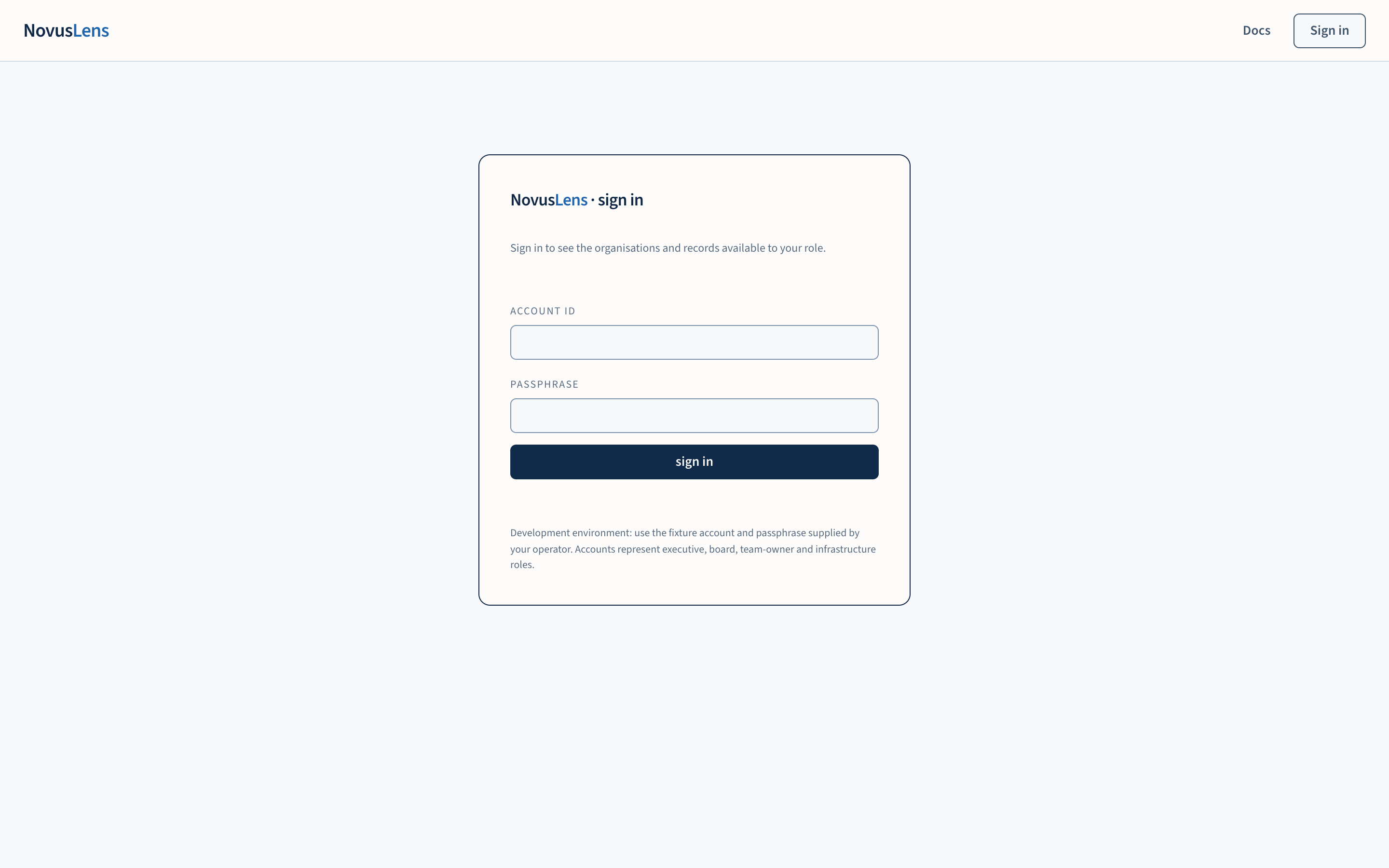
Sign in using the account supplied by your administrator. Check your organisation and role in the Account menu. Choose an organisation to open its Overview.
The left navigation lists five destinations: Overview, Organisation, AI agents, Ask & find and Records. Organisation holds the map, accountability, changes, evidence coverage and the complexity, change and recovery view. Records holds the knowledge libraryKnowledge libraryThe organisation’s written procedures and definitions. Each entry records its source, date and who can read it. NovusLens cites these entries as supplied information., activity log and management brief. Use Docs for the manuals and Product GuideGuideThe help pages inside NovusLens. They explain the pages, input formats and tasks in the version you use. They are product instructions, not evidence about the organisation.. A ? beside a heading opens an explanation beside the current page. Use Open this page in the Guide to read it in the documentation. Escape or Close returns to the product. Pages appear beneath the selected destination. On a phone, use Open navigation to show these links. The account menu also opens documentation and lets you sign out.
The overview presents up to five selected items. Each shows the issue, why it merits review, the recorded accountable ownerAccountable ownerThe person recorded as answerable for a team, service or agent. NovusLens does not assume that this person is also the one who runs it day to day., its evidence and its limitations. The selection covers available categories in a reproducible order. It is not a ranking of business risk. Each card names its next step. Use Inspect supporting records (or Inspect measured dependencies) to investigate and Open responsible team to see its context. How these items were selected explains the selection, and findingsFindingA difference in the records that needs a decision. It includes its sources and can describe a slow handoff, disputed fact or missing owner. held out pending review are counted, never hidden.
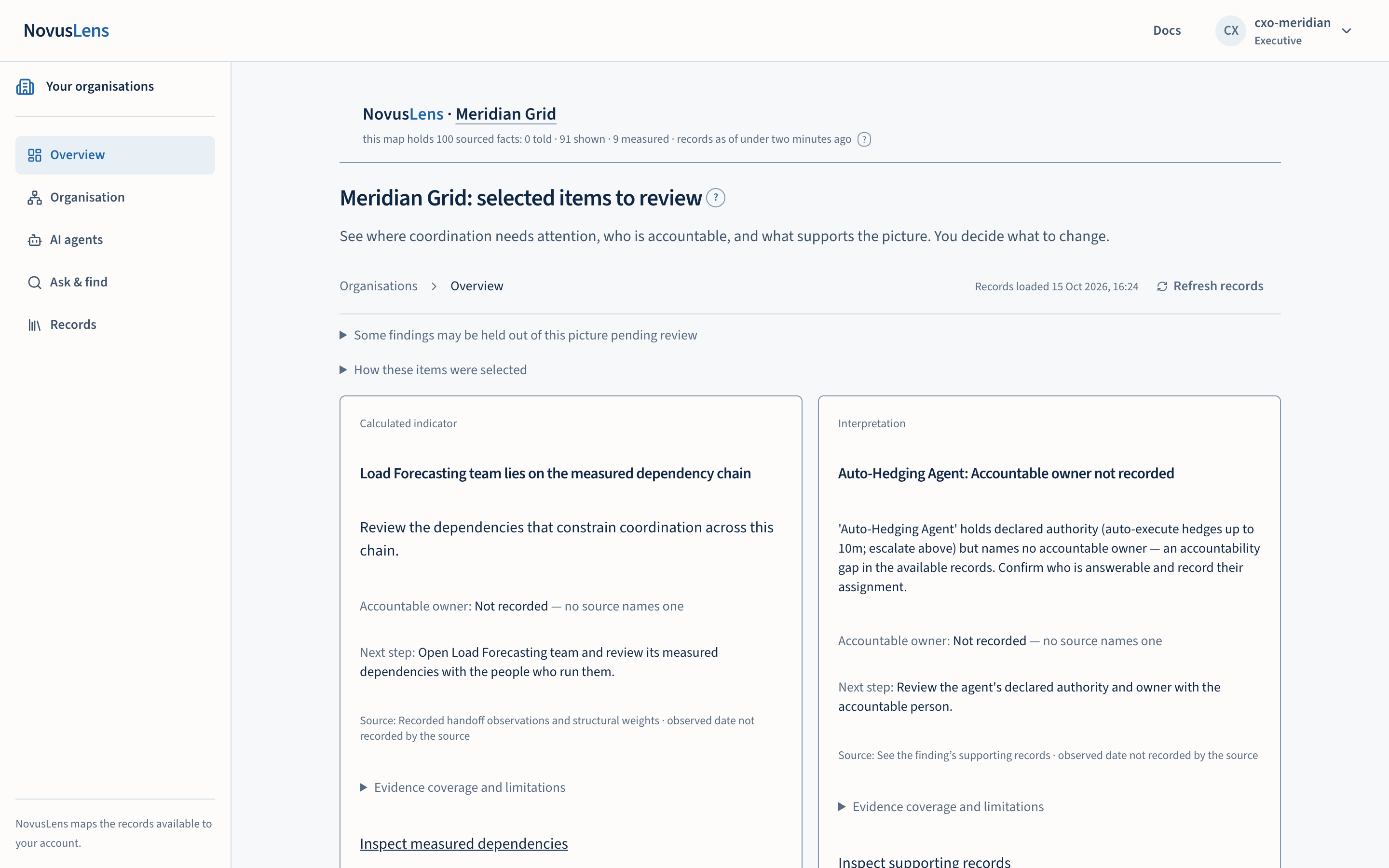
A missing accountable name means no name is recorded here. An empty overview means no available records meet the selection rules. Neither establishes that the organisation has no problems.
If no card is available, open Organisation and select any team on the map. Ask: Who is recorded as accountable for this team, and what supports that name? Read Summary, then Evidence. A missing owner or source is an evidence gap to discuss with the operator. You can follow this route through the tutorial without an Overview card or a model server.
Check what supports a claim
- Told: someone stated it.
- Shown: a document supports it.
- Measured: a connected source recorded it.
These labels describe the evidence available, not infallibility. A source can be incomplete, outdated or contested. Illustrative and simulated evidence demonstrates the product; it is not customer performance evidence. Open the record before relying on a claim.
Understand the scores
Complexity, Agility and RecoverabilityRecoverabilityThe R in C/A/R: how well a team or service restores acceptable service after a failure. Recovery times and tested alternatives can supply evidence. are calibrated indicators. They can represent, for example, system count, change lead timeLead timeThe elapsed time between starting a request or handoff and completing it. or recovery time. Their precise meaning depends on the mapping that produced them. There is no universal interpretation of a score of 60.
Select a team. Its Summary tab shows the scores, and each blank says why it is blank. Its Evidence tab opens the records behind them beside the page: Each record names its source, location within that source, supplier and evidence strength. It gives three separate times: observation, recording and the end of its current validity. You see only the part of a source your role may see. An acquired score record contains the derived score and its source; it is not the original raw telemetryTelemetryMeasurements and activity records sent by a running system, such as ticket timings, network traffic or workflow results..
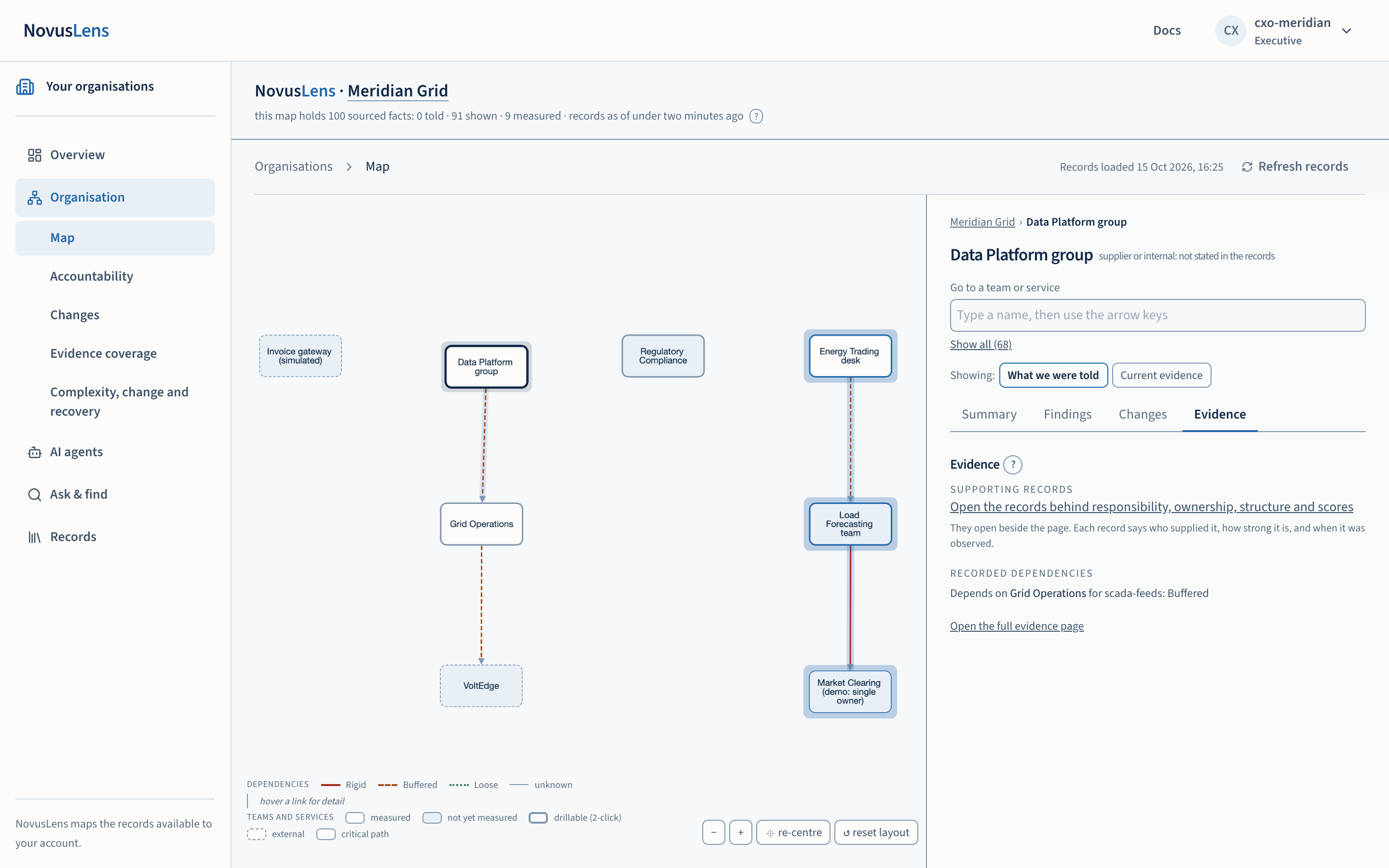
Switching between What we were told and Current evidenceCurrent evidenceA view that uses only measurements recent enough to count. The “What we were told” view uses recorded statements instead. changes both the displayed scores and their evidence. A missing score remains unrecorded. A missing calibration withholds the current indicator. Use How these are assessed, with sources to review the formula, sources and validity. Declared estimates are never substituted for missing current evidence.
Look behind the scores
A team may run fewer systems after outsourcing, yet depend on a supplier it cannot readily replace. The Complexity, change and recovery view brings those questions together. Its supported components feed the cellCellA box on the map that stands for a team, service, supplier or AI agent. It is a unit you can inspect, not necessarily a department or a person. indicators through an explicit local calibration. The map shows the same indicators for the scope including descendants. The customer reviews and decides.
Choose Own operations or Including descendants. The view calculates from available records for that scope; it does not average the scores of underlying teams. Check the sources, dates, missing evidence and any access limits. Coverage shows where records exist, not that every activity has been measured. Missing or expired evidence remains unknown.
Look for work that depends on a provider, evidence of a tested replacement, and whether switching meets the service’s recovery objective. An open APIAPIApplication programming interface: a defined way for one program to request data or actions from another. alone does not establish that a replacement will work. A missing switching test is a question to investigate, not proof that the service cannot recover.
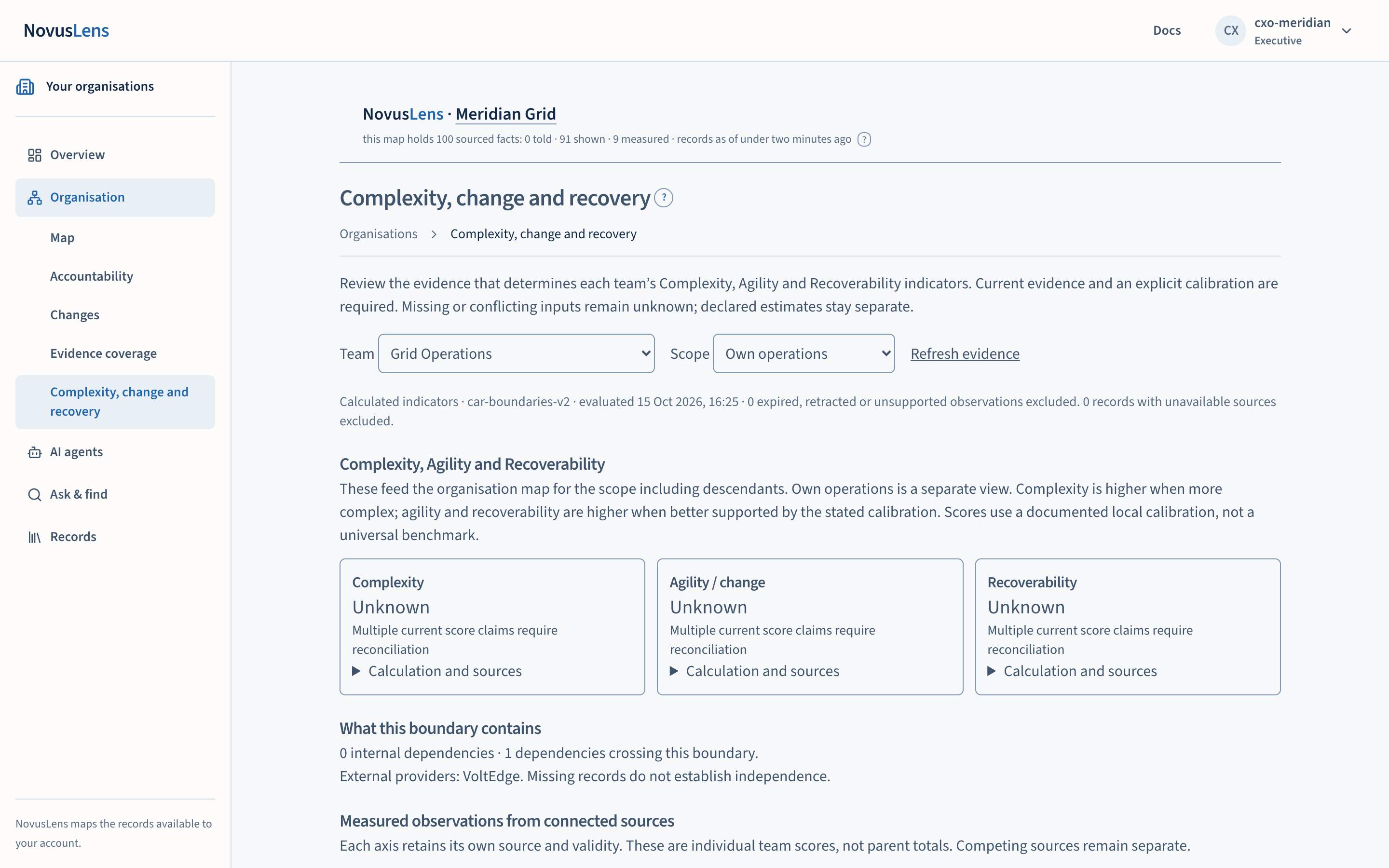
Where resource constraints are recorded beside complexity, discuss the evidence with the named owner. The view does not calculate the right budget or establish that an area is underfunded. Findings can be retained for review where your role permits; later changes do not automatically close them.
Explore dependencies on the organisation map
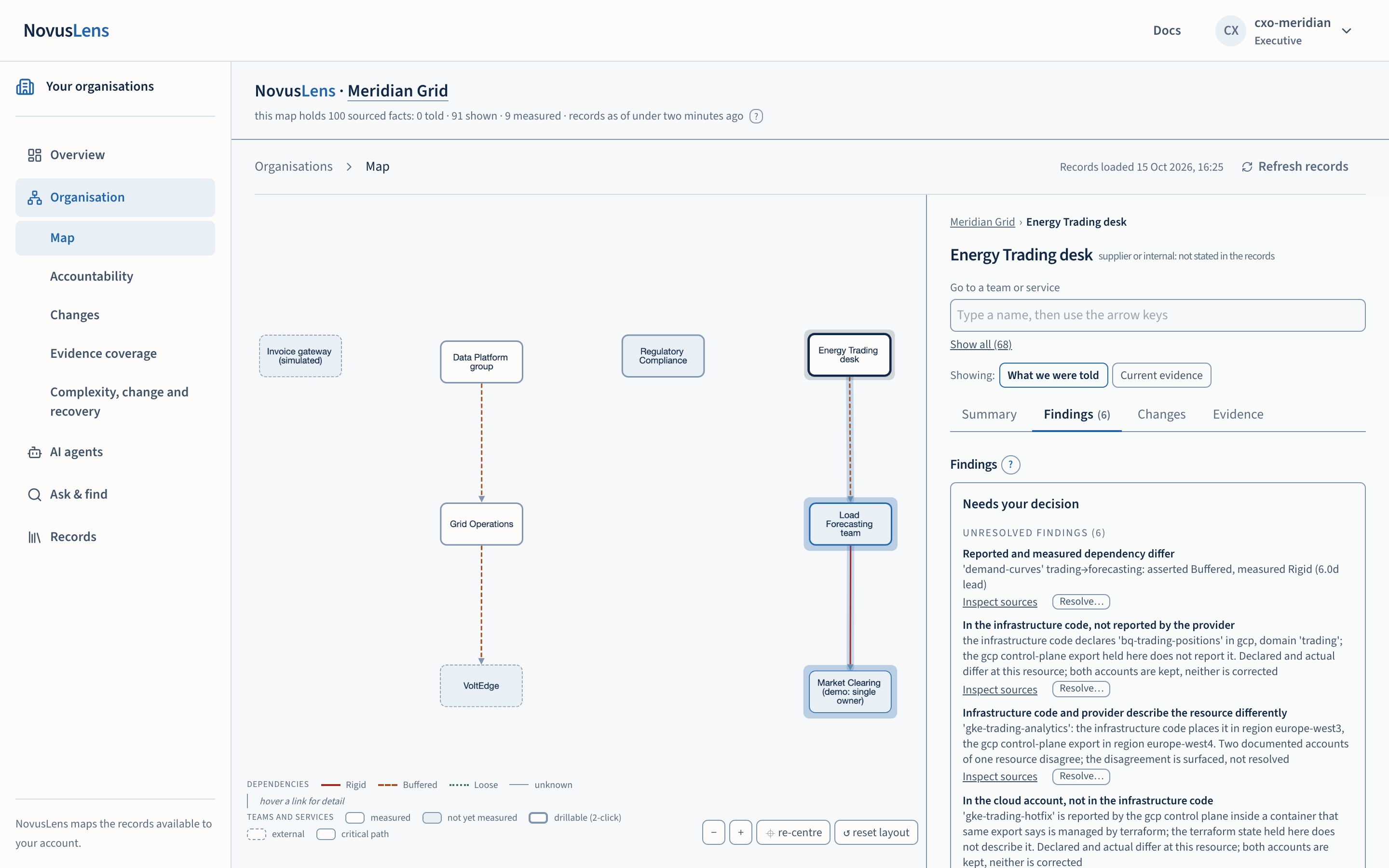
A cell is a box representing a team, service, supplier or AI agent. Select one, or type its name in Go to a team or service at the top of the right-hand panel. The panel has the same four tabs for the whole organisation and for every team: Summary (who answers for it, what it may decide, its duty and scores), Findings (opening with Needs your decision: unresolved findings, open challenges and evidence requestsEvidence requestA request for a document to support something somebody stated. The Findings tab lists it as Evidence requested.), Changes (newest first) and Evidence (the records behind the values, and the recorded dependencies). A line above the tabs shows where you are; select a name in it to go up. What we were told and Current evidence at the top of the panel switch every value between the two. The address keeps the tab, so a shared link opens the same tab. Show underlying teams and systems opens its implementation detail. Selecting and drilling are separate actions. Collapse the detail to return, or use re-centre to fit the current map. Zoom for dense system diagrams.
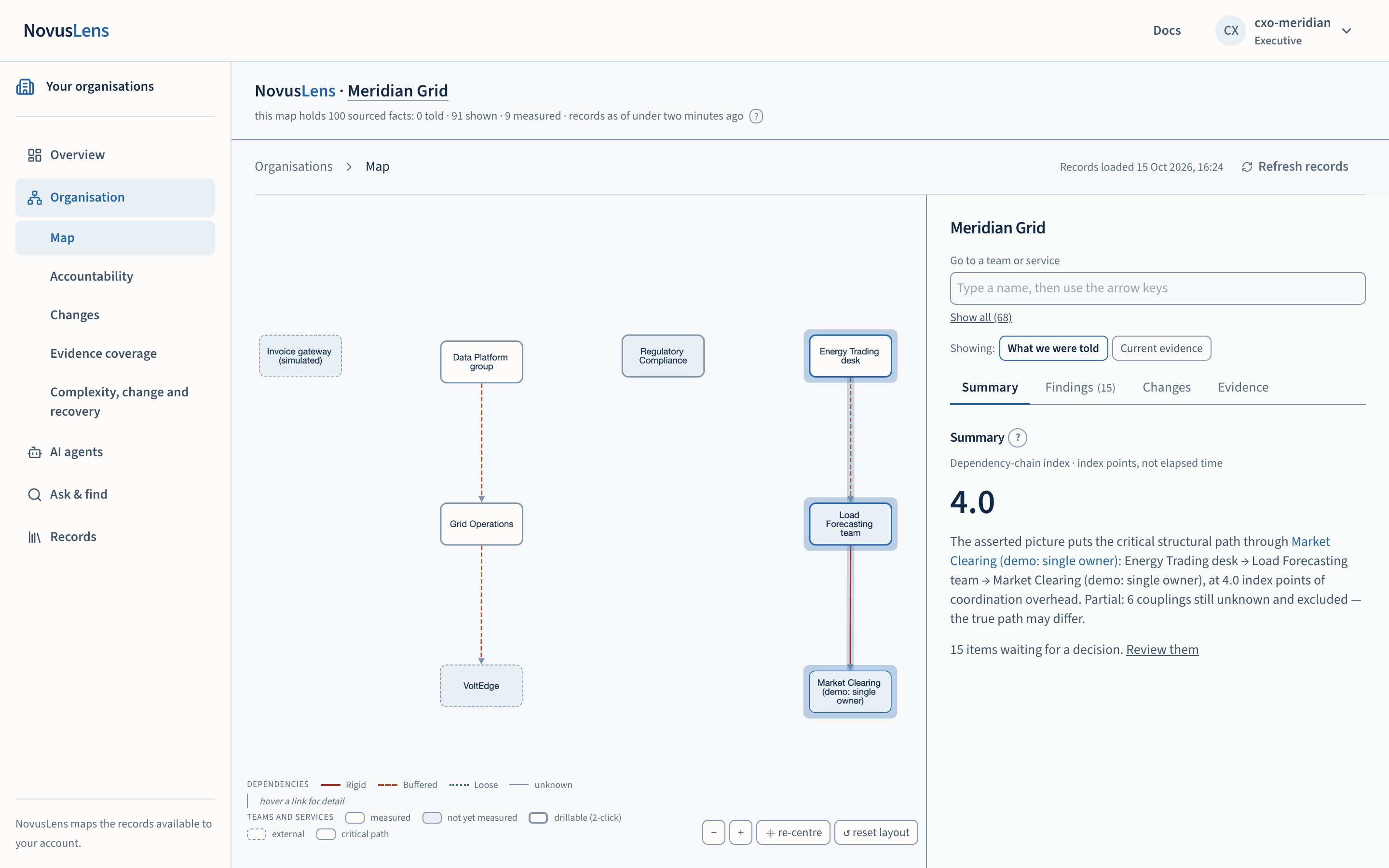
A handoffHandoffWork or information passed from one team or service to another. Its measured or stated completion time determines the dependency class. is a dependency between teams or services. Its recorded class is LooseLooseA handoff that takes about one day or less. It adds 0.5 points to the dependency-chain index., BufferedBufferedA handoff that takes more than one day and up to four days. It adds 1 point to the dependency-chain index., RigidRigidA handoff that takes more than four days. It adds 3 points to the dependency-chain index. or unknown. The displayed evidence explains what supports the classification. Missing measurements remain unknown. A link is not a reporting line or an assignment of accountability.
Dependency-chain index
A chain might run from Sales to Finance to Data. If its links are Buffered (1 point) and Rigid (3 points), it totals 4 index pointsIndex pointsThe unit of the dependency-chain index. Index points are structural weights, not hours or money, and every answer and what-if reports the index in them.. The index shows the chain with the largest total in the selected model. It adds structural weights along that dependency chain. Loose contributes 0.5, Buffered 1 and Rigid 3 index points. Unknown dependencies are excluded and disclosed. The index is not elapsed time, money or a forecast. Read measured lead times separately.
Find the accountable person
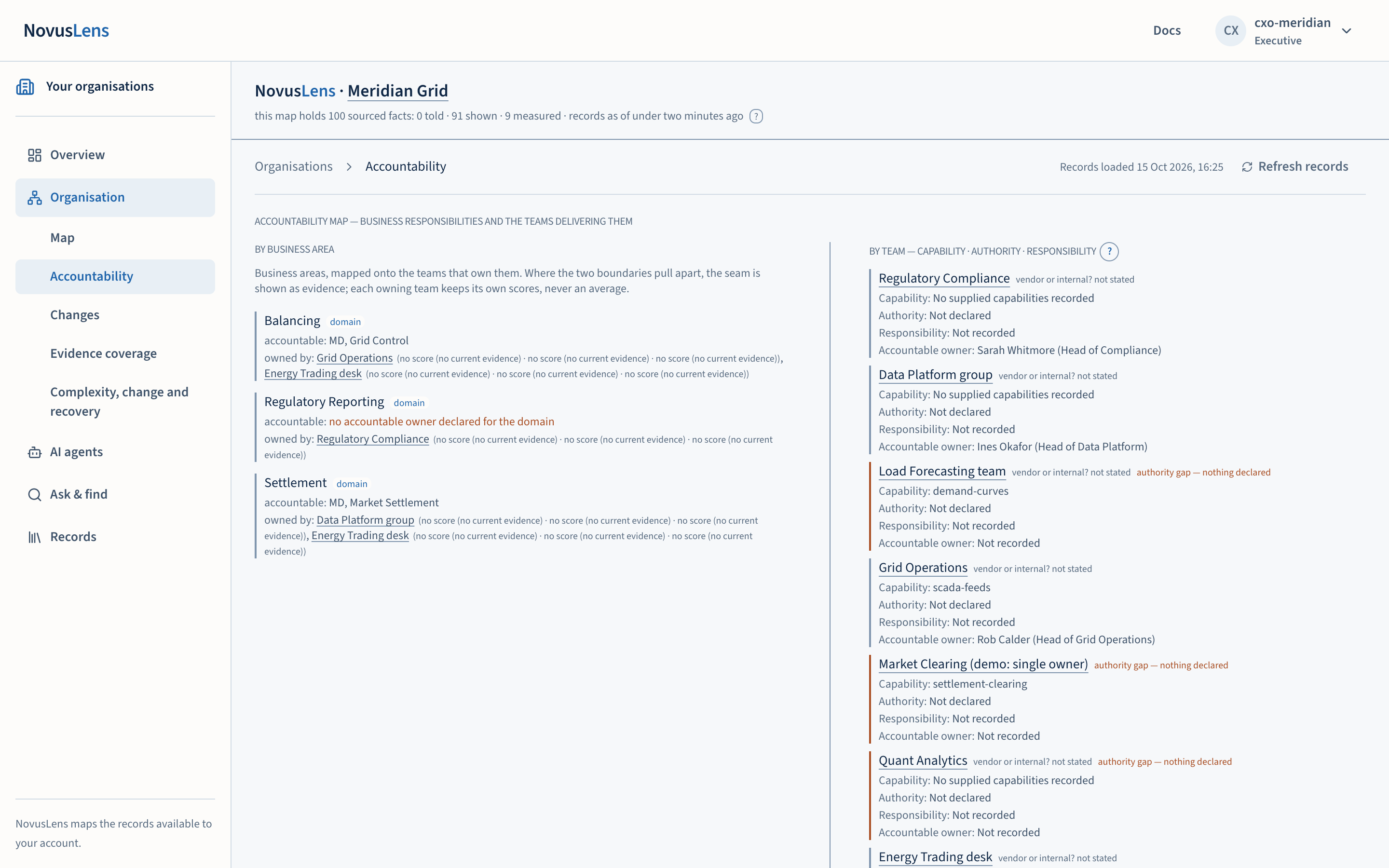
Accountability shows business responsibilities and the teams delivering them. Keep four questions separate: what can this team provide; what may it do; what work is it responsible for; and who is recorded as answerable? The panel labels capability, authority, responsibility and accountable owner separately. Follow a team name to its map context and supporting records.
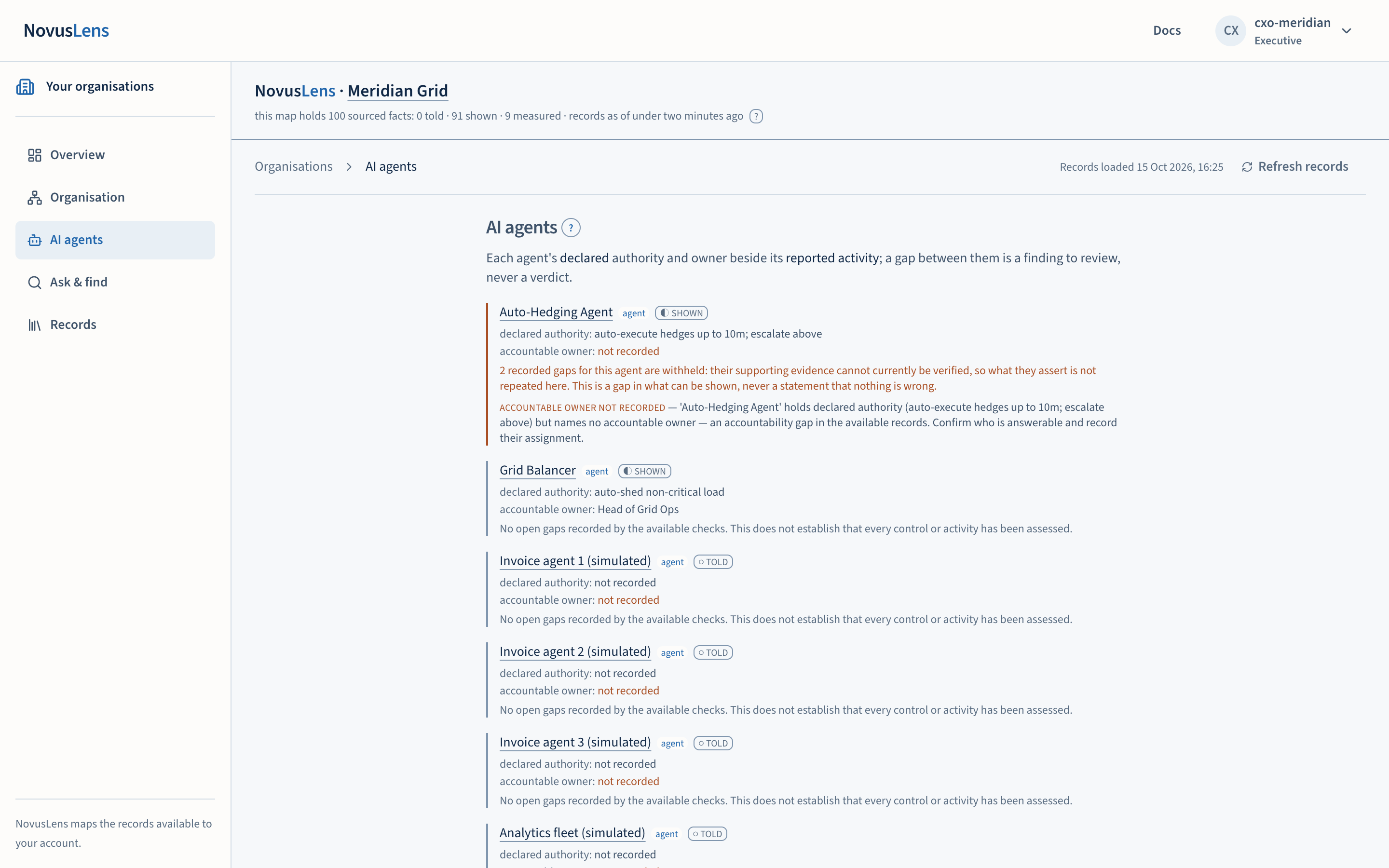
AI agents compares published declarations with available observations. An owner gap is a gap in the record. A missed target does not establish excessive autonomy. No open gap found by the available checks does not mean every control has been assessed. Humans decide what action follows.
Three panels follow the agent list when their records exist. Intervention evidence shows one case at a time. Read the requested amount against the grant’s per-operation limit as an upper-bound comparison only. Check who authorised it, and whether authorisation preceded execution. Review the outcome against its recorded criterion and time window. A correction names the replaced record, replacement source and date; the original remains available. A control reviews the case at an earlier time and states the cutoff it applied.
A fleet incidentFleet incidentA finding about several agents that completed the same operation above their recorded limits in one period. The agents must share something recorded in the model. card groups agents that completed the same operation above their recorded limits within one window. It names their shared unit, provider or grant and lists each member. It describes what they have in common, without establishing why the incident happened.
Recorded remitRemitA written list of an agent’s allowed actions, resources and destinations for information. The list states whether it is complete. and observed activity shows each agent’s declared operations, resources and destinations. It states whether the issuer declared that list complete. Each observed activity is inside the remit, outside it with the failed check named, or review required. An incomplete list never establishes that an activity is prohibited.
Use Declare a remit to write an agent’s scope and approve it under two recorded checks. The result is labelled declared in product and records intent. A runtimeRuntimeThe software that runs a model or agent. A model runtime answers model requests; an agent runtime carries out the customer's agent actions.’s reported deployment appears beside the activities it governed. The panel keeps export generated, deployment reported and enforcement observed as three separate statements. A detector’s classification names the detector and its rule version; NovusLens does not classify the activity. If supporting records change, the finding states how many members remain supported.
Records show when they were loaded and refresh every minute while the page is open. Use Refresh records to check again. Evidence dates remain separate; opened evidence has its own retrieval time and reload control. Times are your local time; the exact timestamp is in the details. Changes starts newest first, with date, team and type filters. A previous-visit marker is local browsing history, not acceptance of the records.
Recording something — resolving a finding, challenging a record, attaching a document — happens in a short form beside the page. A receipt then confirms what was recorded and stays until you dismiss it. Recent in the account bar re-opens this session’s receipts; re-opening checks that you can still see the record.
The Guide
Open Docs, then Product Guide, to find concepts, tasks, input formats and explanations of product messages. The Guide covers told, shown and measured evidence, the dependency-chain index, agent accountability and remits. Tasks include signing in, enrolling a source, adding a probe, demonstrations, preserving records and forgetting an organisation. Check each operational page’s Docker limits before following its commands.
Use documentation search for everyday terms such as “missing score”, “recovery” or “plugin”.
Read-more links open the relevant manual section or reference document.
A ? beside a product heading opens its explanation in a drawer.
Choose Open this page in the Guide for the full documentation page. Existing /guide?id=… links reach that page.
An unknown identifier shows a status message with links to the Guide index and both manuals.
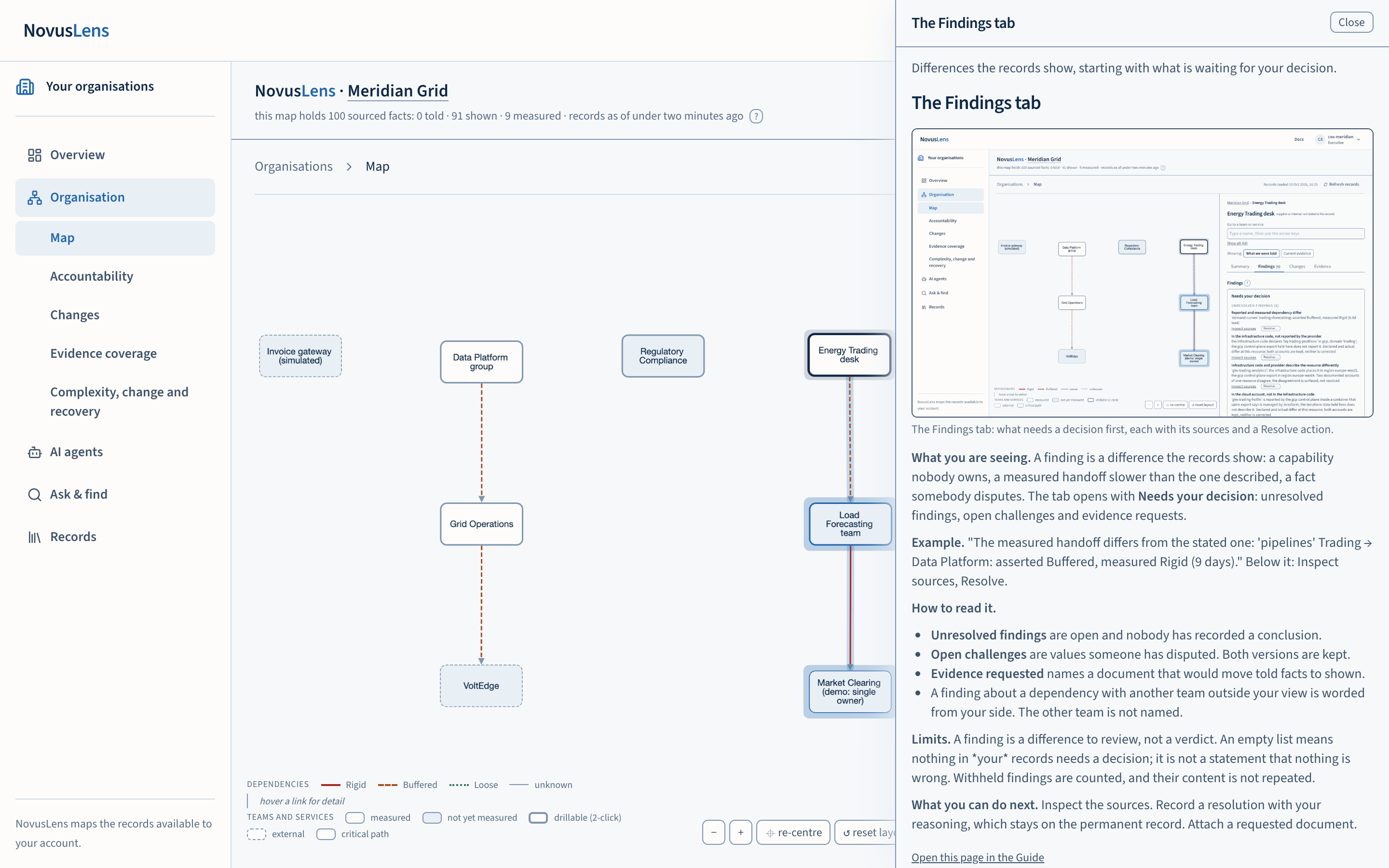
Guide pages are documentation, separate from organisational evidence. They do not become findings, coverage or a brief. Documentation remains available even when no Guide records have been loaded into the organisation’s database. The screenshot below shows the explanation drawer. Use Docs when you want the full documentation.
Ask & find
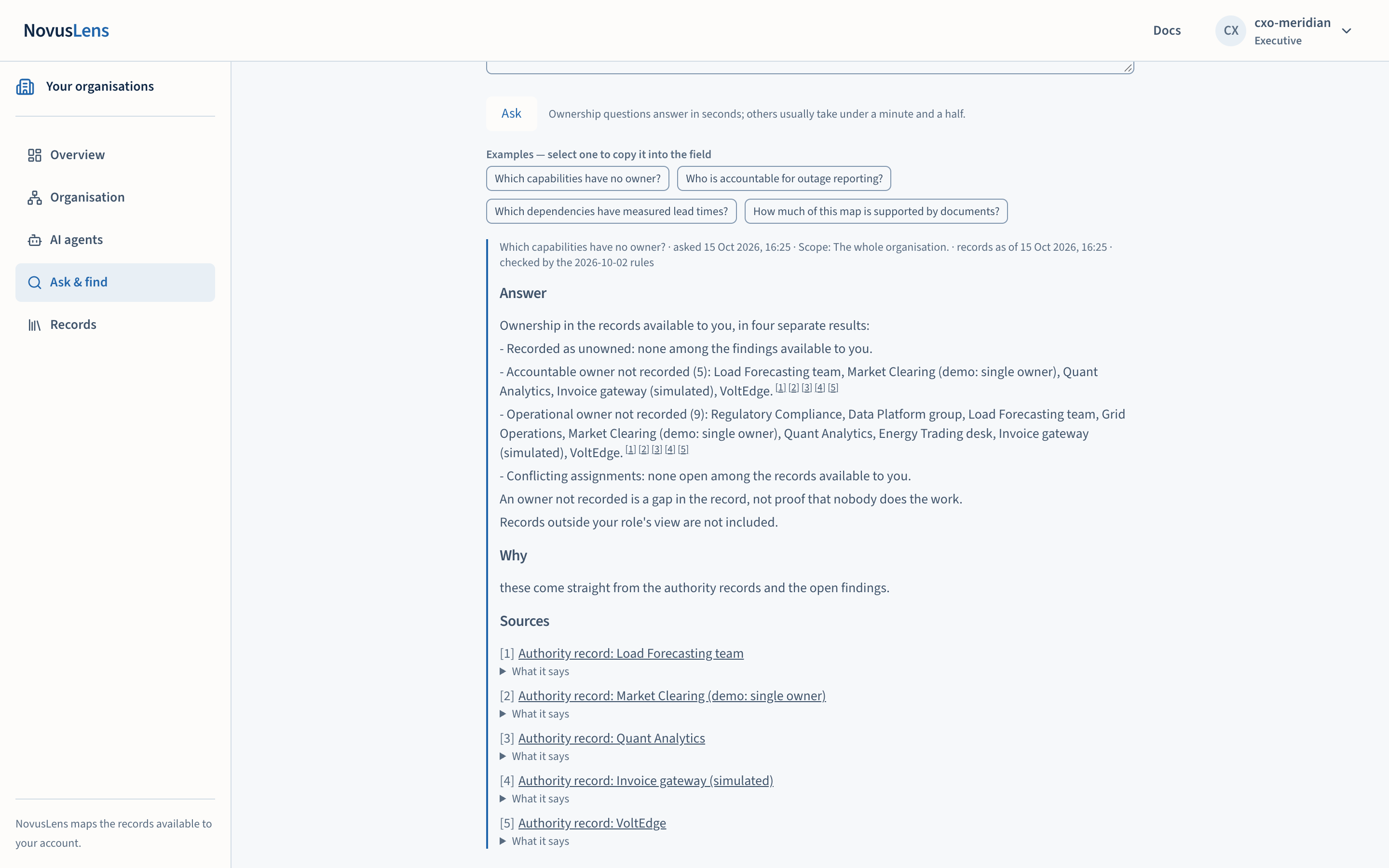
Ask & find has three tabs. Find lists records matching a word or name. It groups teams, findings, requests and knowledge entries, limited to your account’s access. For the Meridian demonstration, finding “outage” reaches the compliance briefing and relevant teams.
Ask composes an answer. Choose the kind of question — about the records, a strategic question, or exploring a change — and what to ask about: the whole organisation as far as your role can see, or one team and the units inside it. Nothing outside that scope is consulted. Select an example to copy it into the field. The answer reads answer · why · sources · what this does not establish: each statement carries numbers pointing to the records it rests on, each source is listed once, and records consulted but not cited are listed apart. Ownership questions such as “which capabilities have no owner?” answer from the records in four separate results. Automated checks cover specific claim types; they do not establish that every interpretation is correct. Conflicting statements can remain visible.
Questions show elapsed time and available progress. Duration depends on the model, hardware and question. Stop waiting stops waiting in the interface; computation may continue. Saved questions remain available to the requesting account for 24 hours, subject to current access and source availability. After navigation or refresh, reopen the request from the Saved questions tab. A failed or interrupted request can be submitted again.
Explore a possible change
In Ask, choose Explore a change as the kind of question, then a dependency and an assumed class, then select Run. Read the named assumption, baseline index, changed index, coverage and trade-off. An index change of −2.5 is not 2.5 hours saved. A modelled trade-off is an input to review with the people doing the work. An unassessed trade-off remains unassessed; it is not a numerical offset against the index change. If a proposed change names an unrecorded dependency, the result says not applied. It lists recorded dependencies touching those teams. Nothing is changed.
Knowledge, changes and activity
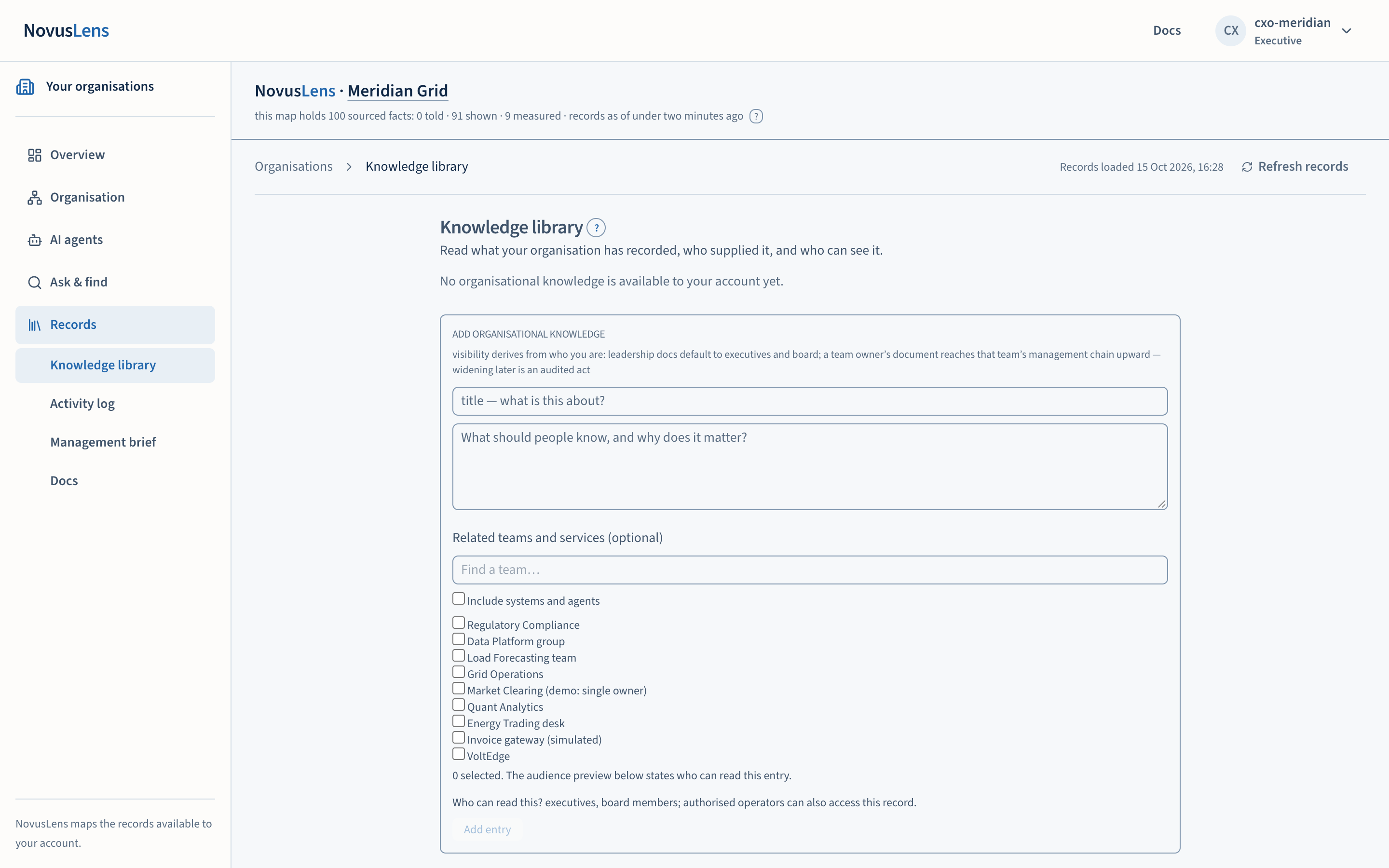
The Knowledge library, under Records, holds attributed organisational statements. Cards show title, author, date, audience and a source link. Expand the safely rendered original to read it. Where your role allows contribution, enter a title and text, select related teams or services, and check the audience preview before saving. A recorded statement is not an independently accepted organisational decision.
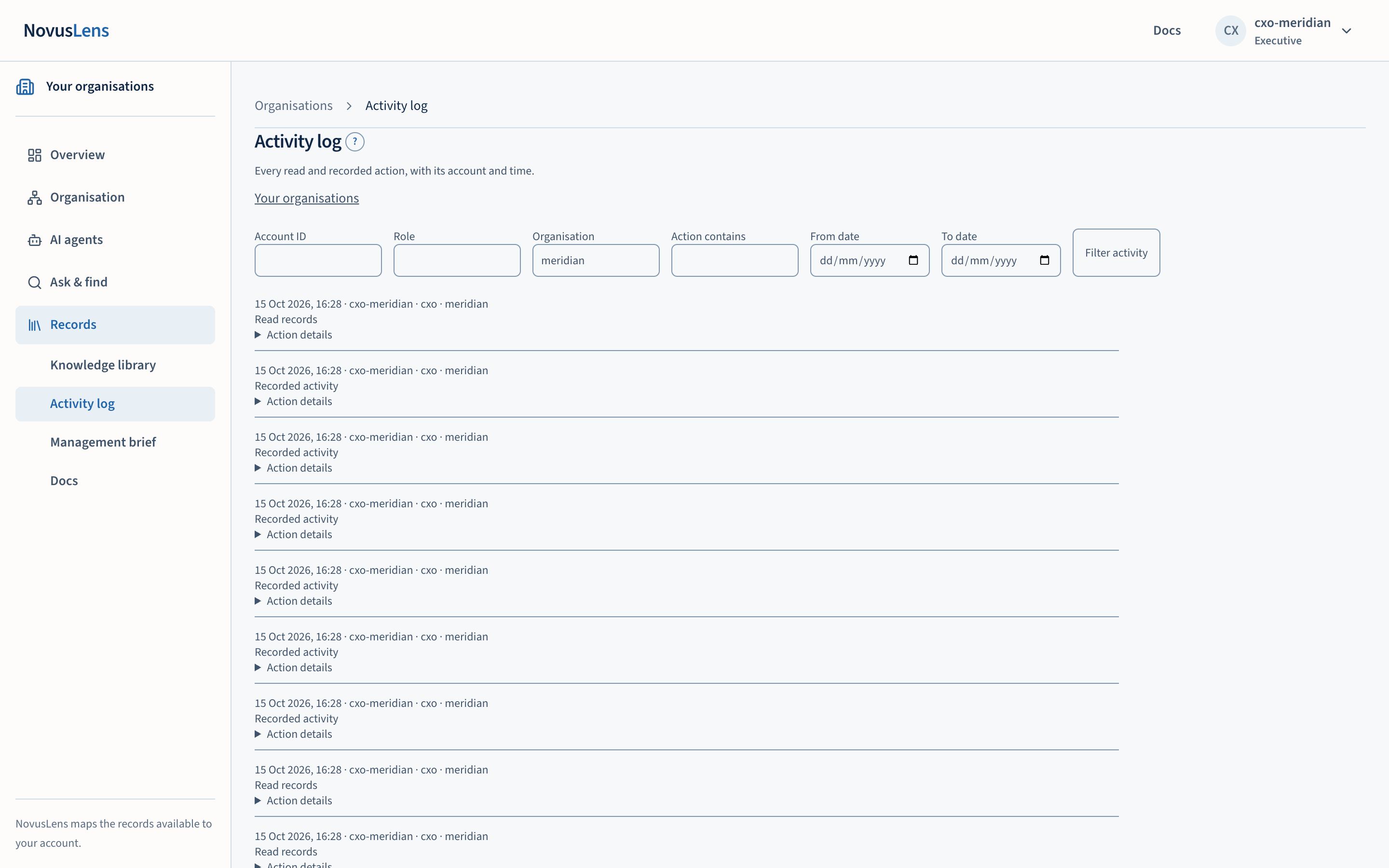
Changes links recent changes to their affected records. Older snapshots may have counts only. A recorded change does not by itself establish why it happened. Activity log lets permitted readers filter by person, role, organisation, date and action. Technical identifiers are available in details. Evidence coverage shows what is supported and how recent it is.
Take a management brief to the discussion
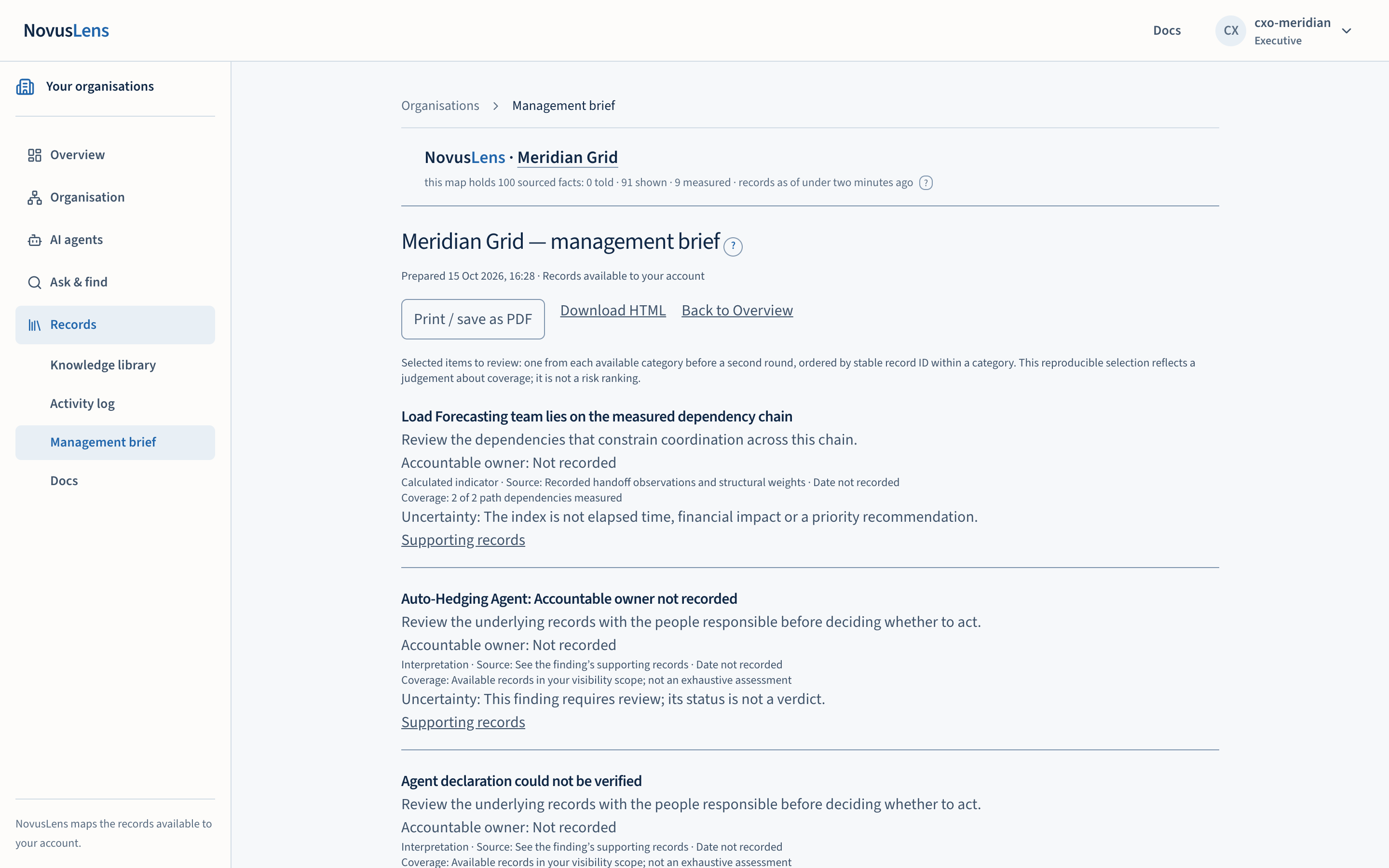
Choose Management brief under Records. Download HTMLHTMLHypertext Markup Language: the format used to describe a web page's content and structure. or use Print / save as PDFPDFPortable Document Format: a file format that preserves a document’s page layout for reading, sharing and printing.. Check the date, account scope, issues and limitations before sharing. Source links require the recipient’s current access. The brief is a record for discussion. It does not recommend reorganisation or guarantee financial benefit.
Access and recovery
Board accounts read records and explore questions. They do not change organisational records. Administration and imports belong to authorised operators. The account menu provides sign-out; use it before switching roles. A viewer name in a link does not override a signed-in account.
If the organisation cannot load, use Retry. If it remains unavailable, give your operator the support reference. A service failure is not evidence that your credentials were wrong. Before a Docker demonstration, the operator follows the operations manual, checks installer status and confirms sign-in and Docs work.