Find the record, ask the question, see where the answer stops.
Ask & find has three tabs. Find returns the records that match a word or a name. Ask composes an answer from the records, with each statement pointing to the records it rests on. Saved questions keeps your questions for 24 hours. Explore a change compares the dependency-chain index for one assumed change. This is critical path lengthCPLCritical path length. The total coordination weight of the longest chain of dependencies in the model. NovusLens reports it as index points, not elapsed time. (CPL), the total weight of the longest dependencyDependencyA link where one unit needs something from another. A dependency is not a reporting line: it shows where work relies on something else. chain. It does not alter any record.
What you will achieve
You will find records, ask questions and read each answer’s sources and limits. You can also return to a question you asked earlier.
Before you start
- Open Ask & find from the top row. The tab you last used is remembered in the address.
- Answers and search results cover only the records your role can see. Nothing outside your chosen scopeScopeThe work, data, activity or access that a rule, statement or calculation covers. For access, it names the records an account can see. For team measures, “Own operations” covers the selected unit. “Including descendants” adds the units beneath it. is consulted.
- Adding what you know about a team is a different action. On a team’s page, Tell us what you know about this team opens a conversation. Contributions are recorded as told and attributed to you. Those contributions are not an answer and do not appear in Ask.
Find a record
- Open the Find tab.
- In Find records, type a team, a responsibility, a findingFindingA difference in the records that needs a decision. It includes its sources and can describe a slow handoff, disputed fact or missing owner., or a document title. The placeholder reads “A team, a responsibility, a finding, a document title…”.
- Select Find. The button reads “Finding…” while the search runs.
- Read the results. They are grouped under Teams and services, Findings, Evidence requestsEvidence requestA request for a document to support something somebody stated. The Findings tab lists it as Evidence requested. and Knowledge entries, each with a count.
- Select a result to open it.
If nothing matches, the page says “Nothing in your records matches. Records outside your role’s view are not searched.”
Ask a question
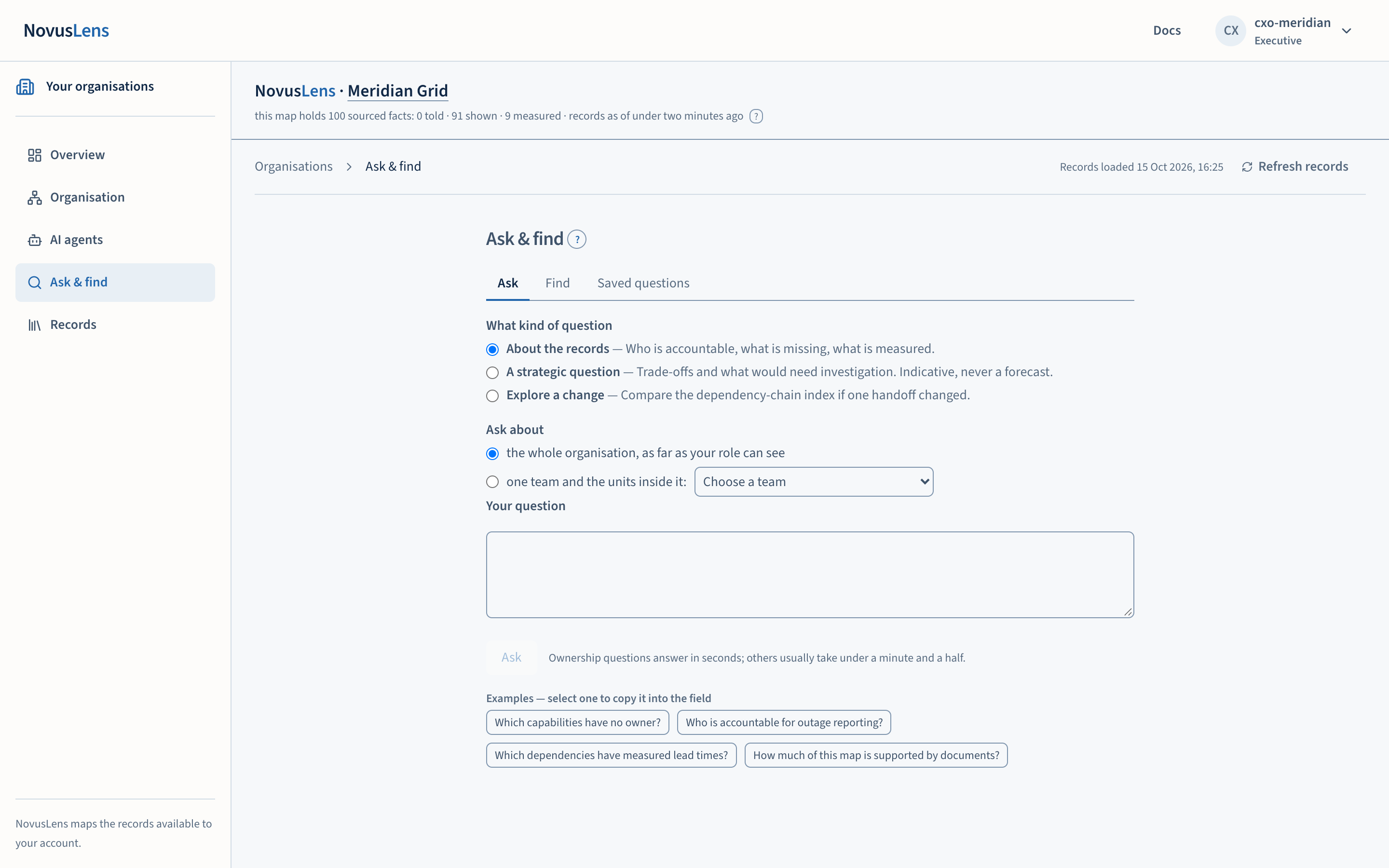
- Open the Ask tab.
- Choose the kind of question:
- About the records asks who is accountable, what is missing, and what is measured. The button reads Ask.
- A strategic question asks about trade-offs and what would need investigation. Its answers are indicativeIndicativeThe label on a scenario or what-if. An indicative result shows one possibility under stated assumptions. It is never a measurement of the future.. The button reads Explore, and the page says a strategic reading usually takes one to three minutes.
- Explore a change is covered in its own section below.
- Choose what to ask about:
- the whole organisation, as far as your role can see, or
- one team and the units inside it, chosen from the list that follows. Nothing else is consulted.
- Type your question in Your question. It can run to 4,000 characters.
- Select the button. Alternatively, select an example under “Examples — select one to copy it into the field” to copy it into the box first. Examples include questions about missing owners, accountability for outage reporting, measured dependency times and how much of the mapMapThe view of teams, services and their dependencies for the selected part of the organisation. Details appear beside the map. has documentary support.
Ownership questions answer in seconds. Other questions usually take under a minute and a half. The page states both times beside the button.
While the answer is being prepared
A status line appears under the button. It shows the latest step, the seconds elapsed and the number of records consulted so far. Stop waiting sits beside it. Selecting it stops the page waiting. The answer may still finish, so you can open it later from Saved questions.
What you will see
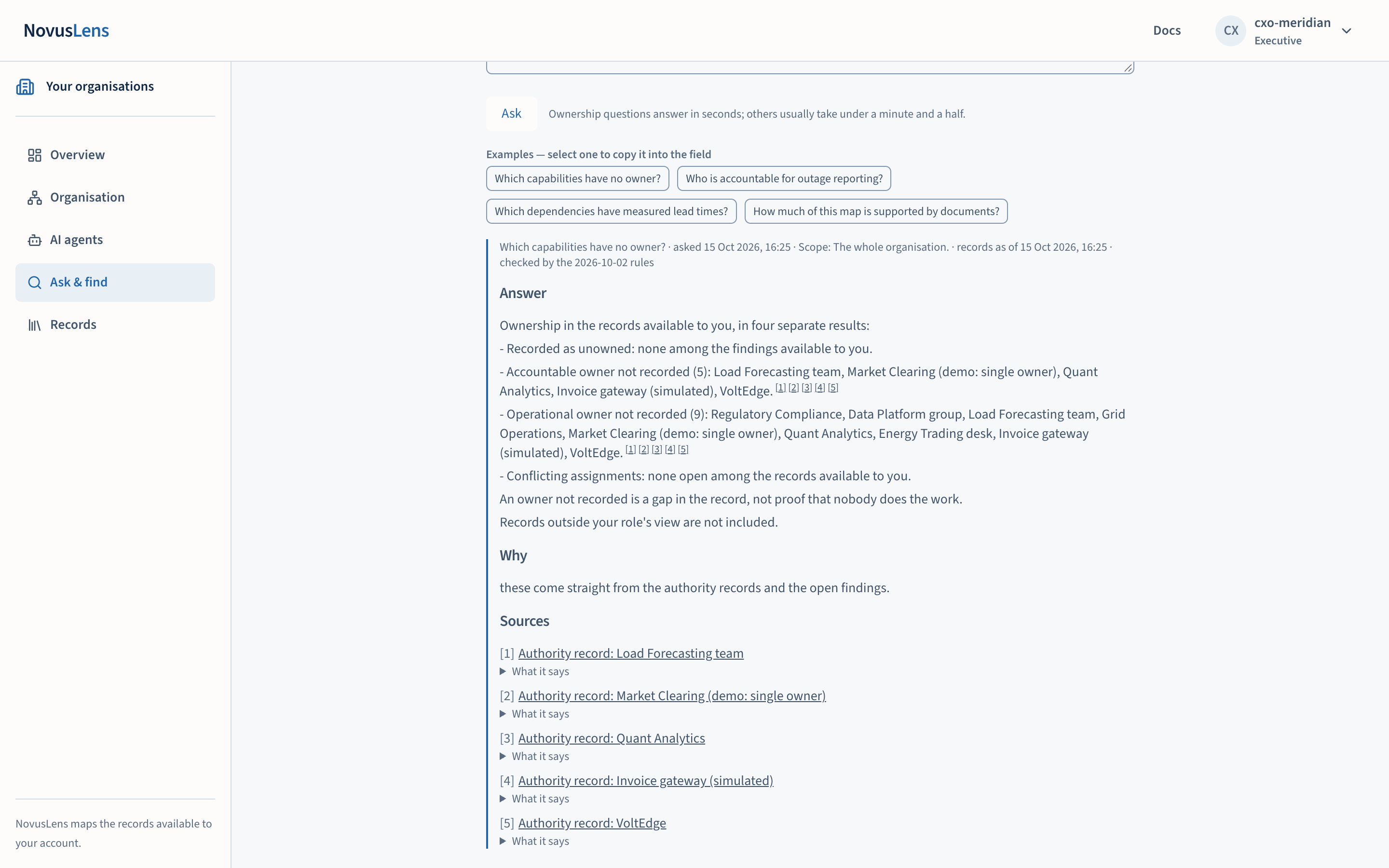
Each answer is one block, headed by the question, the time it was asked, and the scope applied. Where the records carry a version, the line also gives the time the records were current as of.
The block has these parts, in this order:
- Answer. Statements carry numbered references to their sources.
- Why. The mechanism behind the answer, where the answer gives one.
- Sources. The records the statements rest on. Select a source title to open the record. Expand What it says to read the quoted passage.
- Other records consulted (n), not cited above. Records that were looked at but are not the basis of any statement. They are listed apart, so you can see what was searched.
- Why statements were withheld. Shown only when a statement was removed because the records consulted did not support it. The withheld text is not repeated. Expand the summary to see the reason.
- What this does not establish. The limits of this answer, in plain words.
The “What this does not establish” part can name:
- statements withheld because the records consulted did not support them;
- records outside the chosen team, which were not consulted;
- records outside your role’s view, which were not consulted;
- that the answer is an interpretation composed from the records, not an established conclusion.
Explore a change
Use Explore a change to see how the dependency-chain index (CPL) would move if one handoffHandoffWork or information passed from one team or service to another. Its measured or stated completion time determines the dependency class. between two units were assumed to work differently. It is a structural comparison of the current records. It is not a timing estimate and it is not a plan.
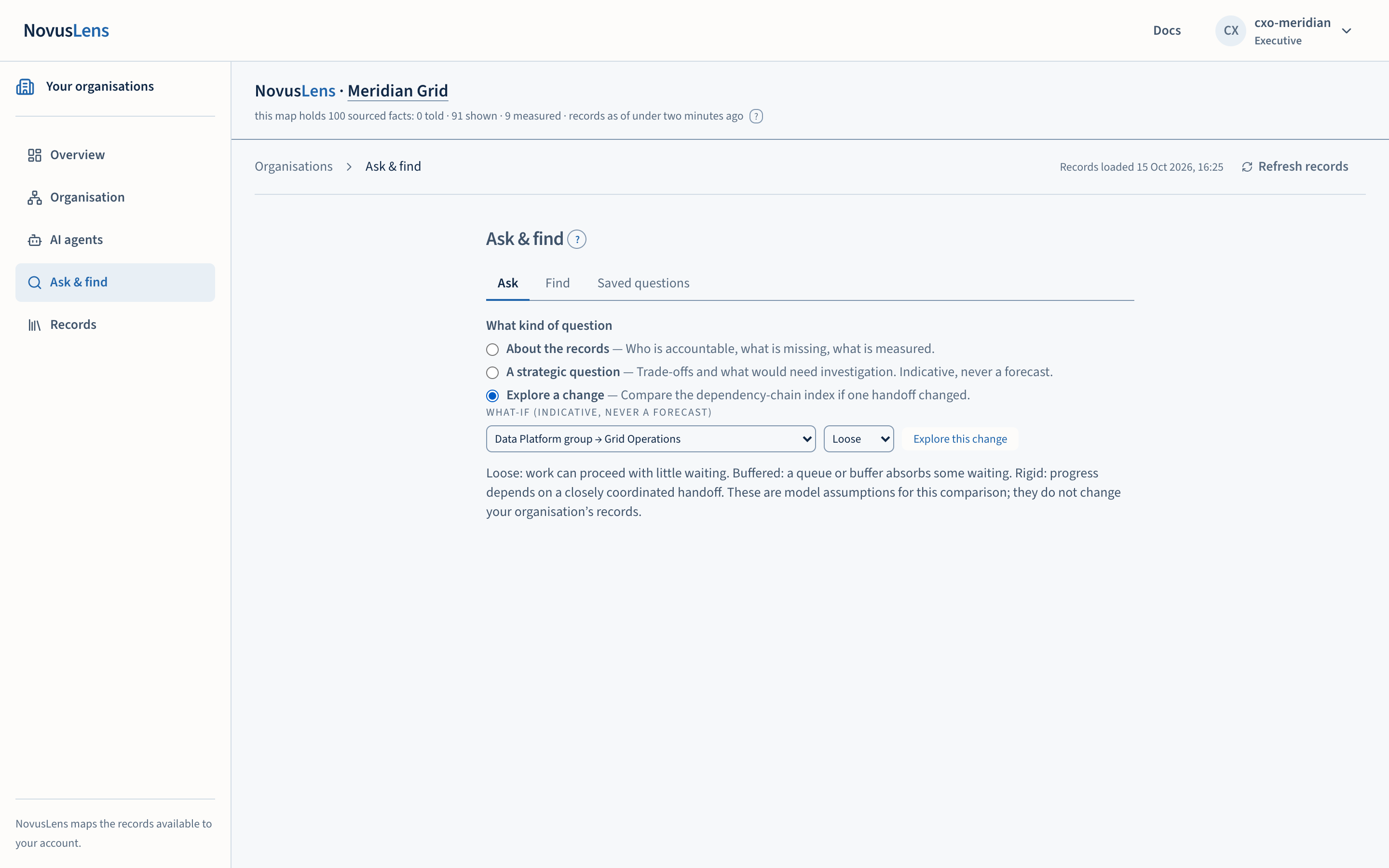
- Open Ask, then choose Explore a change as the kind of question.
- Choose a dependency from the first list.
- Choose an Assumed dependency class: LooseLooseA handoff that takes about one day or less. It adds 0.5 points to the dependency-chain index., BufferedBufferedA handoff that takes more than one day and up to four days. It adds 1 point to the dependency-chain index. or RigidRigidA handoff that takes more than four days. It adds 3 points to the dependency-chain index..
- Loose: work can proceed with little waiting.
- Buffered: a queue or buffer absorbs some waiting.
- Rigid: progress depends on a closely coordinated handoff.
- Select Explore this change.
If no dependencies are mapped yet, the page says “no dependencies mapped yet — nothing to override”.
The result shows:
- the assumption that was compared;
- the baseline index and the changed index;
- Not applied, when the chosen dependency is not held in the records, with the reason;
- the index change, and the coverageCoverageWhat the available records cover, and what is missing. A count such as “3 of 5 dependencies measured” names the measured portion and the gap. figure;
- each trade-off, and whether the page could assess it.
An index change is a change in a structural score. It is not a number of hours saved. Exploring a change does not alter your organisation’s records.
Saved questions
Saved questions lists your questions from the last 24 hours, each with its status (answered, or the request’s status) and the time it was asked. Select a question to open it.
An answer opens only while its evidence is still available to you. The page checks again every 30 seconds and when the window regains focus. If the evidence is no longer available, the answer is removed and the page says “This saved answer is no longer available. Ask again for a current answer.”
Stop waiting
Stop waiting ends the wait in this window only. The page then says “Stopped waiting. The answer may still finish; open it from Saved questions later.”
When something goes wrong
- A question cannot be accepted. The page shows the reason the service gives, or “The question could not be accepted.”
- Outside your access. “This is outside your current access. Choose a team you can see, or sign in again.” Choose another scope, or sign in again.
- Expired or no longer available. “This request has expired or is no longer available to your role.” Ask again.
- The request timed out. “This request reached its time limit. You can submit it again.” Submit it again, or narrow the question.
- The request failed. “This request could not be completed. Please try again.”
- The service is unavailable. “The question service is unavailable. Please try again.” Saved questions show “Saved questions are temporarily unavailable.” when the list cannot load.
- Find is unavailable. “Search is unavailable. Please try again.”