Several twins, one picture, and each region keeps its records.
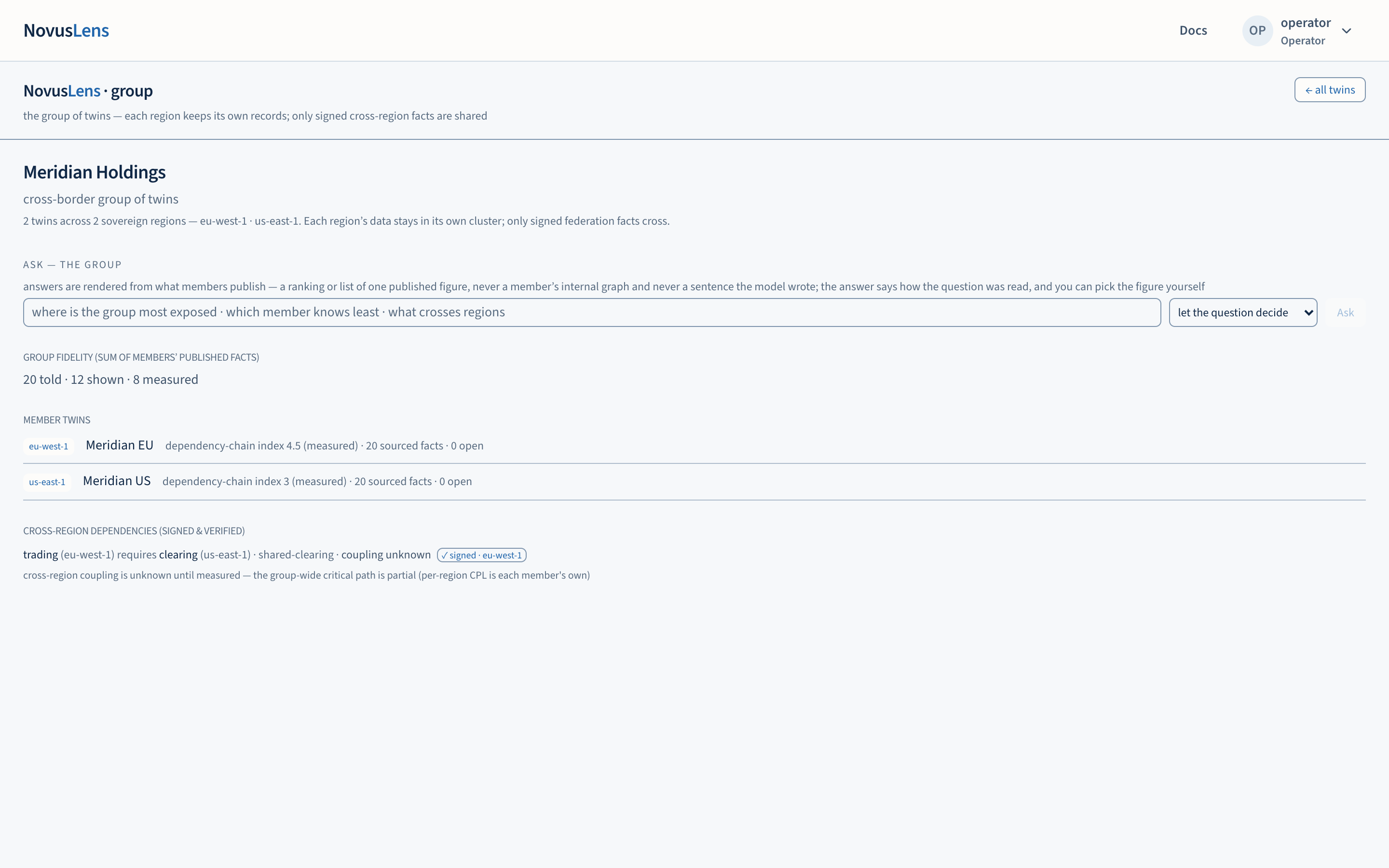
A group brings several organisation twins together under one name. Each member is a twinTwinNovusLens’s model of one organisation, built from records about its teams, services and how they rely on one another. It is only as current as those records. for one region, and each region keeps its own records. The group view shows what each member publishes and the dependenciesDependencyA link where one unit needs something from another. A dependency is not a reporting line: it shows where work relies on something else. that cross a region boundary. Only cross-region facts that are signed are shared between regions.
What you will achieve
By the end of this page you will be able to:
- open a group from your list of organisations;
- read the group’s totals and each member twin’s figures;
- tell a verified cross-region dependency from one whose signatureDigital signatureA check calculated with a signing key that can detect whether a record has changed. Identifying the signer also requires a trusted link between that key and its owner. could not be verified;
- ask the group a question, and choose the published figure it ranks by;
- understand what the group address means, and why a group page shows nothing without one.
Before you start
You need an account that can see the group. The group view reads your sign-in session. Sign in, then go to your list of organisations. Groups that your account can see are listed under Organisation groups, each with its number of twins and regions.
The group is not in the main navigation. You reach it from that list.
Steps
- Sign in and open your list of organisations.
- Under Organisation groups, select the group. The address changes to the group’s identifier, written as
group_idin the address bar. - Read the header. It gives the number of twins, the regions they sit in, and the statement that each region’s data stays in its own clusterClusterA group of computers running together as one installation. Each regional NovusLens installation keeps its own records..
- Read the Group fidelityGroup fidelityThe group view’s counts of recorded facts at each evidence level: told, shown and measured. The counts describe the records, not the organisation’s performance. line. It is the sum of the members’ published facts, given as told, shown and measured counts. It is not a single score for the group.
- Read Member twins. Each member names its region and shows its index with the evidence level used. It also counts sourced facts and open findingsFindingA difference in the records that needs a decision. It includes its sources and can describe a slow handoff, disputed fact or missing owner.. Select a member name to open that twin in the usual way.
- Read Cross-region dependencies (signed and verified). Each line names the units that depend on each other across regions and the capability involved. It gives the handoffHandoffWork or information passed from one team or service to another. Its measured or stated completion time determines the dependency class. class or marks it unknown.
- To ask the group a question, type it in the question box. Optionally choose a published figure to rank by, and a direction. Select Ask.
What each region keeps
The group view is built from two things only:
- the summary each region publishes about itself, which is its counts and figures;
- the cross-region facts that carry a signature, checked against the key the sending region has published.
It does not show one region’s internal organisation model to another region. The privacy floorPrivacy floorThe rule that a unit with fewer than five mapped people is shown as a small team, never as a number. The key-person finding says fewer than five and never says who. applies inside each region as it does everywhere: a unit with fewer than five mapped people is never reduced to a count (see the privacy floor). Where a line says “signed”, the signature has been verified against that region’s published key. Where it says “unverified”, the claim is shown as recorded but its signature did not verify. Treat an unverified line as a question to raise with the region that sent it.
The current region signing key is calculated from the region’s name by a public rule. Anyone who knows the name can calculate that key. A valid signature therefore checks whether the content changed; it does not establish who signed it. See federation and its limits.
Asking the group
The question box answers from what the members publish. It does not write its own account of the group. The answer names the published figure it used, lists its supporting sources, and says how it read your question.
You can choose the figure yourself, rather than letting the question decide. The choices are the dependency-chain index, told facts, shown facts, measured facts, open findings, domains and cross-region couplings. For a ranked figure you choose highest first, lowest first, or a plain list. Cross-region couplings are listed, not ranked.
What the group address means
The group page is addressed by a group_id in the address bar. That identifier names one group, and the page shows nothing else until it is given.
- If the page is opened without one, it says “no group selected” and shows the identifier to pass.
- If the page is opened without a signed-in account, it refuses. It does not open as a default account.
- In a customer deployment, the viewer comes from your sign-in session only. Development builds also accept a viewer in the address, but a customer account must sign in.
You do not need to type the identifier. Use the link on your list of organisations.
What it does not do
- It does not merge the regions’ records. Each region’s records remain where they were recorded.
- It does not create a cross-region dependency. A dependency appears only when it is signed and verified, or when it is shown as unverified.
- It does not give one score for the whole group, and it does not average the members’ scores.
- It does not show a member twin’s internal organisation model.
When something goes wrong
- “could not load group” (followed by the error). The group’s snapshot was not returned. Refresh the page. If it persists, the group may not be available to your account.
- “no viewer — this page refuses rather than defaulting open”. Your session has ended. Sign in and open the group again.
- A line says “unverified”. The signature did not check against the sending region’s published key. Do not treat the line as confirmed. Raise it with the region that sent it.
- “none federated yet”. No signed cross-region dependency has been recorded for this group.