Up to five items to review, chosen by a fixed rule.
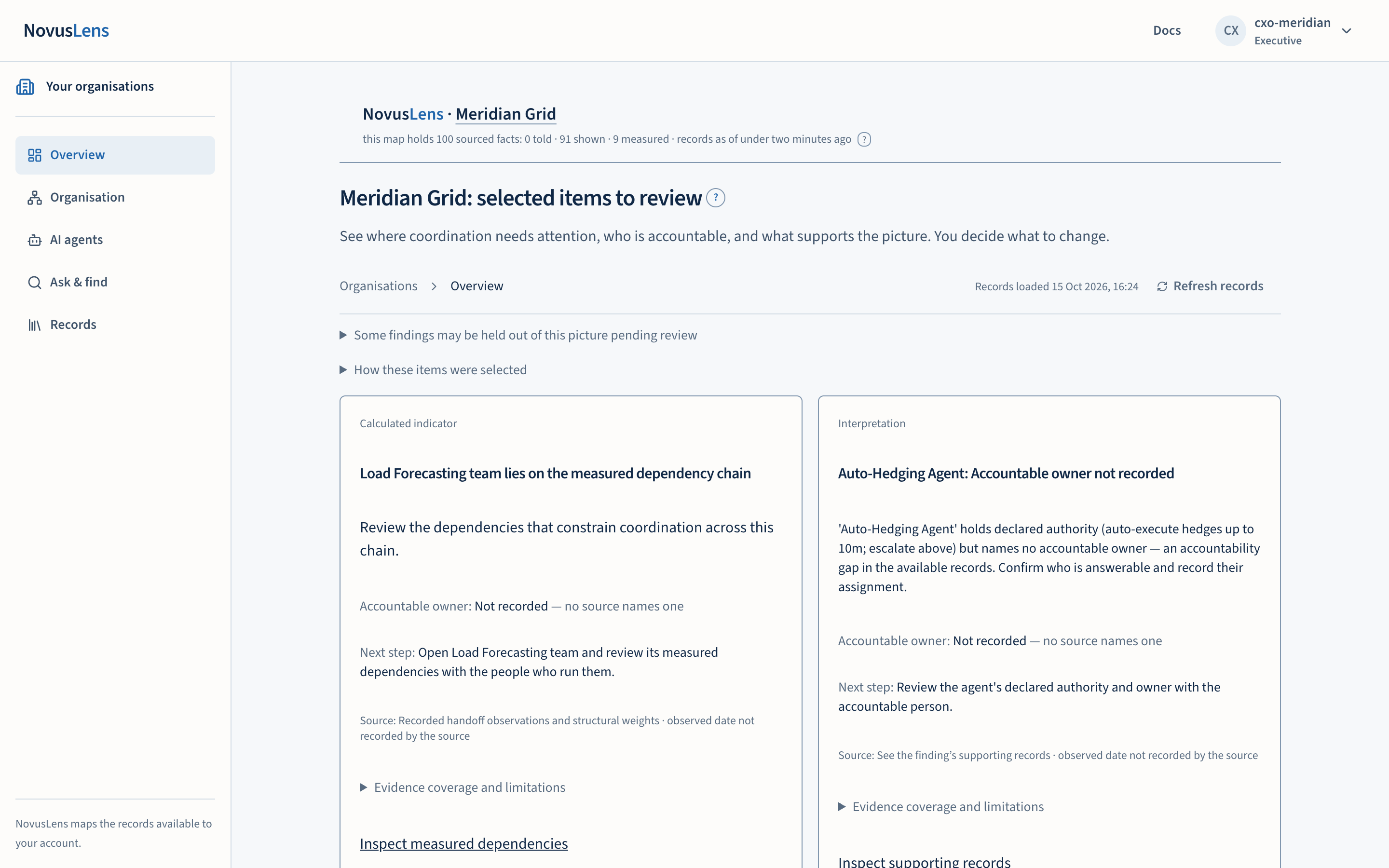
The overview is the first page of an organisation. It shows up to five items that the available records put forward for review. Each item names what it concerns, the recorded accountable ownerAccountable ownerThe person recorded as answerable for a team, service or agent. NovusLens does not assume that this person is also the one who runs it day to day., a next step, its source and its limits. The overview points you to the records. It does not decide what to change.
What you will achieve
- Read the items the records put forward for review, in the order the selection rule gives.
- See whether each item has a recorded accountable owner, and what the source is.
- Open the supporting records, or the responsible team on the mapMapThe view of teams, services and their dependencies for the selected part of the organisation. Details appear beside the map., for any item.
- Check whether some findingsFindingA difference in the records that needs a decision. It includes its sources and can describe a slow handoff, disputed fact or missing owner. are being held out of the picture pending review.
Before you start
- Sign in and choose an organisation. If you open the overview without choosing one, NovusLens sends you to your organisations page. See Signing in and choosing an organisation.
- The overview only uses the records your role can see.
Steps
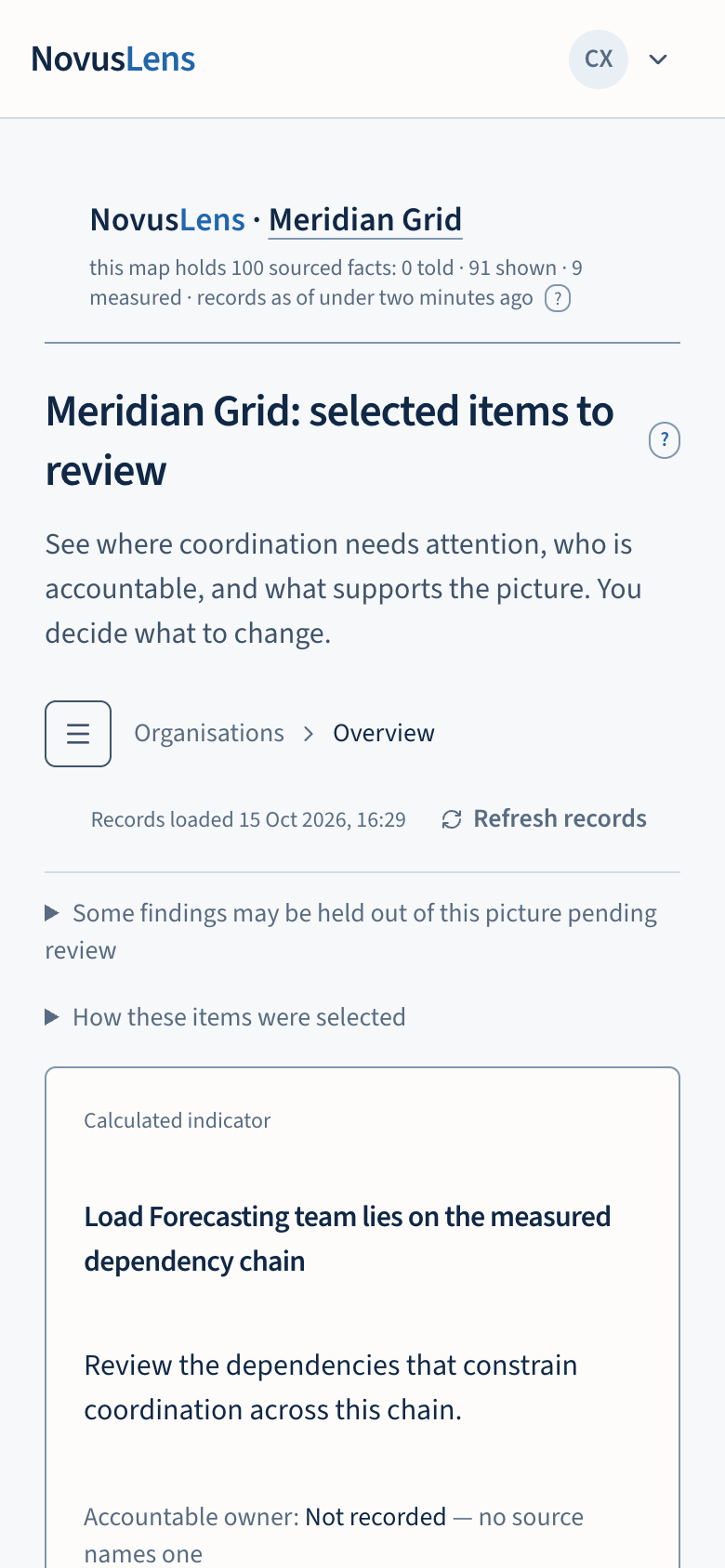
- Read the heading, which reads with the organisation’s name: selected items to review. Read the line beneath it.
- Read each card from top to bottom. Its label at the top gives the basis of the claim. The title and any record text follow.
- Read the Accountable owner line and the Next step line.
- Read the Source line. It names where the item came from and when it was observed.
- Open Evidence coverageCoverageWhat the available records cover, and what is missing. A count such as “3 of 5 dependencies measured” names the measured portion and the gap. and limitations on any card you intend to rely on.
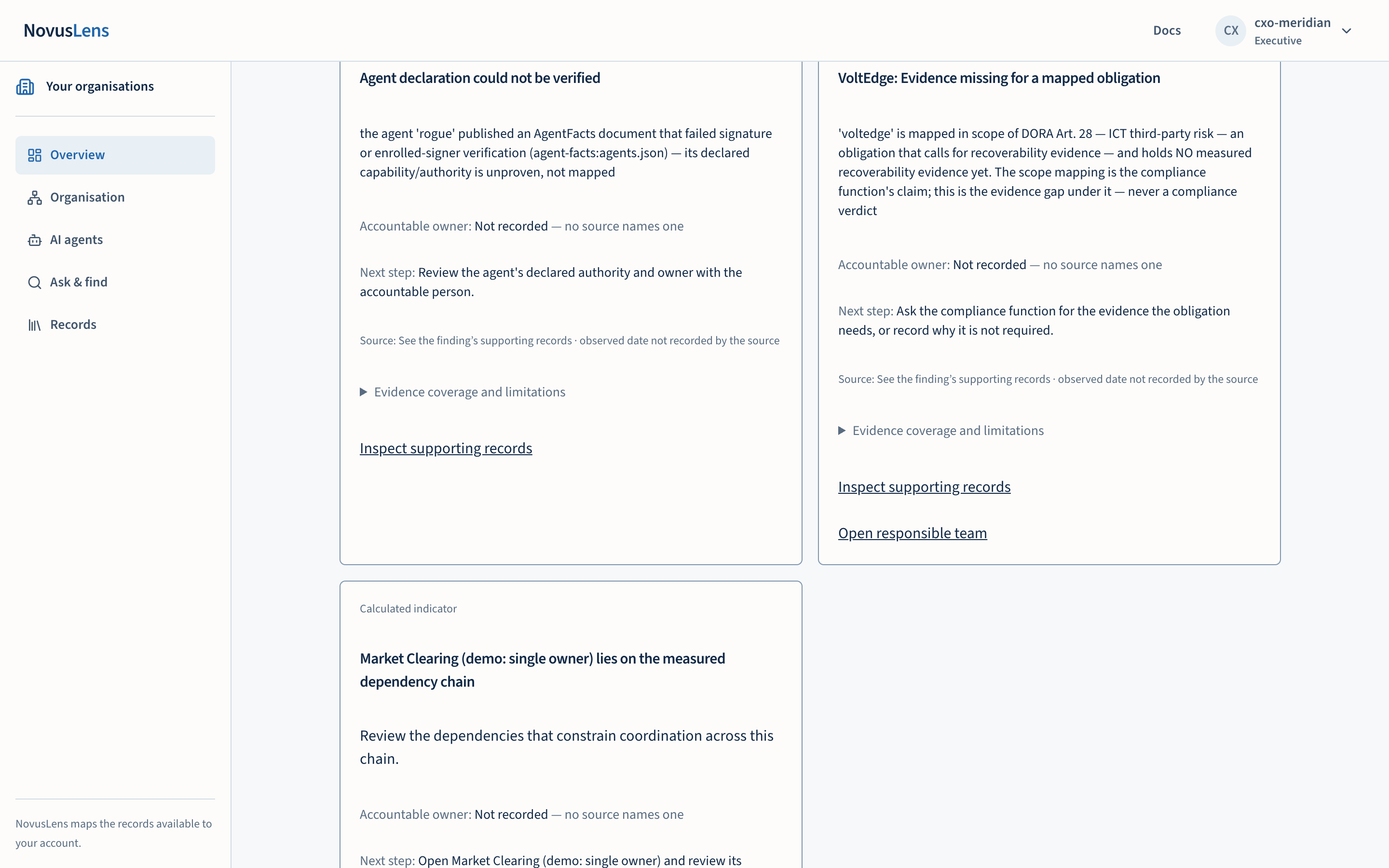
- Select a link at the foot of the card. Inspect supporting records opens the records. On a dependencyDependencyA link where one unit needs something from another. A dependency is not a reporting line: it shows where work relies on something else. card the link reads Inspect measured dependencies. Open responsible team appears only when the card names a team, and opens that team on the map.
- Where the count line says some items are not shown, select Show all selected-category items to see the rest.
Two links below the cards go further. All findings opens the findings on the map. Prepare the management brief opens the brief for the same organisation. The management brief is described on its own page.
What you will see
The five cards
The overview shows at most five cards. Each card comes from one of five categories: a dependency, an ownership gap, a difference between what was recorded and what was measured, a regulatory obligation, or a contradiction between records. A dependency card concerns the measured dependency chain, which the overview calls the critical path lengthCPLCritical path length. The total coordination weight of the longest chain of dependencies in the model. NovusLens reports it as index points, not elapsed time. (CPL): the chain of dependencies with the largest total index. That index adds structural weights along the chain. It is not elapsed time, money or a forecast.
The label at the top of each card gives the basis of the claim. It reads one of three things: Measured observation, Calculated indicator or Interpretation.
The owner line reads Accountable owner:, then the recorded owner. Where no source names one, it reads Not recorded, followed by the words no source names one. That is a gap in the record. It is not a finding that no owner exists.
The next step line suggests one action. It might ask you to review measured dependencies with the team or confirm and record an accountable owner.
The source line gives where the item came from, and the date it was observed. Where the source has no date, it says the date is not recorded by the source. An observation more than 30 days old carries a note asking you to review whether it still applies.
How these items were selected
Select How these items were selected to read the rule. It works in rounds. The overview takes one item from each category that has candidates, in a fixed order. It then takes a second round, and so on. Within a category, items are ordered by their stable record identifier. The result is reproducible. It is a judgement about coverage, not a ranking of business risk.
The count line below the cards reads: a number of items meet the selection rules, and a number are not shown. Items not shown are not removed from the record. They are the items that come after the first five in the order above.
Findings held out pending review
Select Some findings may be held out of this picture pending review to open a check on finding support. If the check finds nothing to hold, the section does not appear. If it finds findings, it lists how many are withheld within your review scopeScopeThe work, data, activity or access that a rule, statement or calculation covers. For access, it names the records an account can see. For team measures, “Own operations” covers the selected unit. “Including descendants” adds the units beneath it.. Each withheld finding gives its reason, one of three:
- The original input revisions were not recorded, so a new assessment is needed.
- The boundary feedBoundary feedRecords supplied by the customer’s own systems about activity at the edge of an agent or service. NovusLens reads those records; it does not watch the agent. behind the finding was last acquired more than three of its refresh intervals ago, so its support has run out. Acquire the feed again to refresh it.
- Supporting inputs changed, or cannot be checked with your current access. Reassess before you rely on the finding.
Each withheld finding also shows its human review status. A withheld finding is still unresolved. Its original claims are hidden because their support is unavailable. Refresh support check runs the check again.
The destinations you reach from here
The navigation on the left offers five destinations: Overview, Organisation, AI agents, Ask & find and Records. Pages appear beneath the destination you have open. On a phone, select Open navigation to see them:
| Destination | Pages inside it |
|---|---|
| Organisation | Map, Accountability, Changes, Evidence coverage, and Complexity, change and recovery. The last page presents the three measures, Complexity, Agility and RecoverabilityRecoverabilityThe R in C/A/R: how well a team or service restores acceptable service after a failure. Recovery times and tested alternatives can supply evidence. (C/A/RC/A/RThree separate scores for a team or service: Complexity, Agility and Recoverability. Each uses current evidence and the customer’s stated scoring rules.). |
| AI agents | Opens its own page |
| Ask & find | Opens its own page |
| Records | Knowledge libraryKnowledge libraryThe organisation’s written procedures and definitions. Each entry records its source, date and who can read it. NovusLens cites these entries as supplied information., Activity log, Management brief and Docs |
| Administration | Shown to operator accounts only |
Complexity, change and recovery, and the Activity log, are shown to executive, board and operator accounts. Administration is shown only to operators.
The page also shows a line reading Records loaded, with the time, and refreshes every minute while the page is open. Select Refresh records to load them now. Check the time on that line before you rely on the records.
What the overview does not do
- It does not rank items by business risk, and it does not say which item matters most.
- It does not show every issue in the organisation. It shows the items the available records put forward under the rule above.
- A missing owner, a missing date or an empty overview does not establish that no problem exists. An empty overview means no available records meet the rule.
- It does not carry a verdict. The labels describe the kind of evidence, not whether a team is right.
When something goes wrong
- No items are shown. The page reads: no items meet these selection rules in your available records. This does not mean there are no issues. It links to evidence coverage, where you can see what the records support.
- The findings check fails. The page reports that finding support could not be checked, and that this does not mean there are no disagreements. Select Refresh support check to try again.
- The count does not change after a refresh. Check the Records loaded time. The page refreshes every minute only while it is open.