Complexity, change and recovery, read against the evidence.
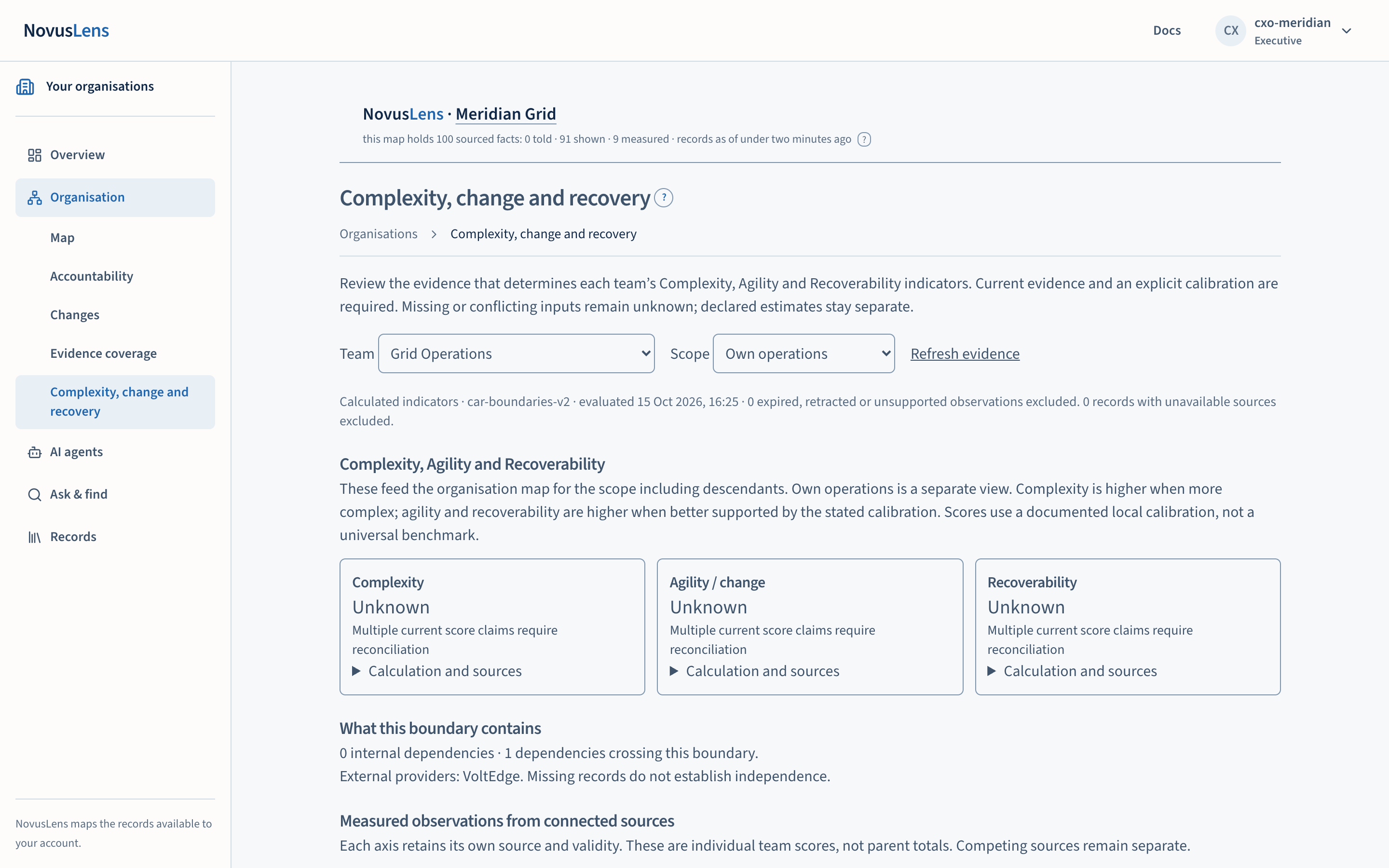
This page shows three structural indicators for one team: Complexity, Agility and RecoverabilityRecoverabilityThe R in C/A/R: how well a team or service restores acceptable service after a failure. Recovery times and tested alternatives can supply evidence. (C/A/RC/A/RThree separate scores for a team or service: Complexity, Agility and Recoverability. Each uses current evidence and the customer’s stated scoring rules.). Complexity is what the team depends on and must manage. Agility is how readily it can change. Recoverability is how it can restore acceptable service after a failure. Each is a calculated indicator with its own calibrationCalibrationThe customer's own rule that turns raw figures, such as a gauge, a workflow history or an incident log, into a C/A/R score. A score moves when the calibration moves, and the change is recorded. and its own records. None of them is a verdict on the team.
What you will achieve
You will be able to:
- see the three indicators for one team, for either its own operations or its operations including the teams beneath it;
- see which records each indicator rests on, when each record was observed and until when it counts as current;
- see which blanks are missing evidence, which are missing a calibration and which are conflicts still to be reconciled;
- record a dependencyDependencyA link where one unit needs something from another. A dependency is not a reporting line: it shows where work relies on something else. as told, then discuss switching suppliers with the team’s owner.
Before you start
You need a signed-in account with the Organisation destination in view. The Complexity, change and recovery page is shown to executive, board and operator accounts only. Other roles do not see it beneath Organisation in the navigation.
The page reads the team’s current evidenceCurrent evidenceA view that uses only measurements recent enough to count. The “What we were told” view uses recorded statements instead.. If you want to see the older picture, use the mapMapThe view of teams, services and their dependencies for the selected part of the organisation. Details appear beside the map., where the header switches values between what was told and current evidence. This page always shows the current evidence.
Choose the team and the scope
- Open Organisation, then Complexity, change and recovery.
- Choose a team in the Team list. Teams that are external to your organisation are not offered.
- Choose a scopeScopeThe work, data, activity or access that a rule, statement or calculation covers. For access, it names the records an account can see. For team measures, “Own operations” covers the selected unit. “Including descendants” adds the units beneath it. in the Scope list:
- Own operations calculates from the records of the selected team only.
- Including descendants calculates from the records of the selected team and every unit beneath it.
- Select Refresh evidence to fetch the latest records for that team and scope.
The two scopes are separate calculations. The page does not add up or average the scores of the teams beneath a unit. A parent value is calculated from the records in its scope.
Read the coverage line
Under the controls, a line states the calculation version, the time it was evaluated, and how many observations were left out. Observations are left out when they have expired, were retracted or are not supported. Records from sources that are unavailable to you are also counted and left out.
Under the three indicators, the Coverage section states, for each indicator, how many teams in this scope have evidence for it. For example, a line can read that evidence covers two of five teams. Where the count is zero, the page says that the measure stays unknown for that scope.
Coverage shows where records exist. It does not show that every activity has been measured.
Read the calibration
Each indicator is a calculated value. It comes from observations, through a written local calibration: an agreed rule that converts observations into a number from 0 to 100. A value of 60 has no universal meaning. Compare two values only where their definitions, scope and observation periods are the same.
To see the rule for an indicator, open Calculation and sources under that indicator. The panel shows the base value, the inputs and how each changes the score, the calibration identifier and the validity period. Where a calibration is labelled as illustrative and built on demonstration evidence, the page says so beside the value.
The page also shows the snapshot identifier and the list of sources under Calculation references. Those identifiers let a reviewer find the exact inputs.
Read the blanks
A blank is never shown as zero. The page gives a reason for each one:
- Unknown, with a reason, when the indicator cannot be calculated. The reason is set by the calculation. For example, several current claims for the same score need reconciling before one can be chosen.
- Not recorded in the components table, when the team has no value for that component.
- No current evidence, when there are no current records behind a component.
Where a value is missing because of an absent calibration, the page withholds the indicator rather than filling it in. Declared estimates are kept separate from measured inputs and are not used to fill a gap.
Read the measured observations
The section Measured observations from connected sources lists each observation behind an indicator. Each entry names its source, observation time and expiry time. It also gives the observation and calibration identifiers. Each indicator keeps its own source. Competing sources stay side by side.
Each figure here is an individual team’s score. These are not parent totals.
Read the boundary
What this boundary contains gives the number of internal dependencies and the number of dependencies that cross the boundary. It also lists the external providers in the supplied dependency evidence. If none are recorded, the page says so. A missing record does not establish that a team is independent of a provider.
Outsourcing and switching a supplier
A team may run fewer systems after it outsources work, and still depend on a supplier it cannot readily replace. This page is where that question is raised. It does not answer it.
To record what someone has told you about a dependency:
- Open Record a dependency. This is available to executive and operator accounts. Board accounts read the page but do not record.
- Choose the Provider, enter the Required capability, and choose the Dependency role: not yet established, required for this capability, or optional.
- Enter the Review validity in days, from 1 to 365. The default is 30.
- Select Record as told.
The record is created as told. It is not a verified recovery claim. The page then confirms that supporting documents and switching tests have not been supplied. Do not enter personal activity or confidential free text in this form.
An APIAPIApplication programming interface: a defined way for one program to request data or actions from another. (application programming interface) lets software request data or actions. A published API does not establish that a replacement supplier will work. A missing switching test is a question to take to the owner of the service. It is not proof that the service cannot recover. Ask the owner for the tested recovery time and the record of the test.
Resource constraints
The page does not show a resource-constraint note. Where a resource constraint is recorded beside a team, discuss it with the named owner. The page does not calculate the right budget and does not establish that an area is underfunded.
Keep items for review
Where the page lists items to review, executive and operator accounts can select Keep these items for owner review. This records them in the existing review workflow, and the page confirms how many were recorded. Keeping an item does not close it. A later change in the evidence does not close it either.
Operator and executive accounts can also select Archive current inputs for replay. When the archive is complete, a link to the saved replay record appears. It is not offered when your view is limited.
When something goes wrong
- A limited-visibility notice appears. Your role can see only some of the teams and records in this scope. Outside-scope dependencies may exist, so this is not a complete assessment of the organisation or of a service.
- A notice says that some recovery evidence is awaiting an update or no longer has current support. The linked inputs are excluded from the indicators until their support is re-established.
- The page shows an error. Select Refresh evidence. If the error remains, give your operator the time shown in the error.
Dependency-chain index
The map shows a separate measure, the dependency-chain index. It is the weight of the longest chain of dependencies, its critical path lengthCPLCritical path length. The total coordination weight of the longest chain of dependencies in the model. NovusLens reports it as index points, not elapsed time. (CPL). LooseLooseA handoff that takes about one day or less. It adds 0.5 points to the dependency-chain index. links count 0.5 points, BufferedBufferedA handoff that takes more than one day and up to four days. It adds 1 point to the dependency-chain index. links 1 point and RigidRigidA handoff that takes more than four days. It adds 3 points to the dependency-chain index. links 3 points. The index is in index pointsIndex pointsThe unit of the dependency-chain index. Index points are structural weights, not hours or money, and every answer and what-if reports the index in them.. It is not elapsed time or money. Read measured lead timesLead timeThe elapsed time between starting a request or handoff and completing it. separately.