Keep four questions apart, and read the gaps as gaps.
The Accountability view shows who answers for each part of the organisation. It separates four things that are easy to run together: what a team can provide, what it may decide, what work it is responsible for, and who is recorded as answerable for it. Use it to see where those four answers are missing or disagree, and to take the gap to the people who can close it.
What you will achieve
By the end of this page you will be able to:
- read the four separate answers recorded for a team;
- find a business area that has no accountable ownerAccountable ownerThe person recorded as answerable for a team, service or agent. NovusLens does not assume that this person is also the one who runs it day to day., or a team with an authority gapAuthority gapMissing records about what a team or agent may do, or who answers for it. The label describes a missing record, not proof that nobody has authority.;
- follow a team name back to its place on the mapMapThe view of teams, services and their dependencies for the selected part of the organisation. Details appear beside the map. and to its supporting records.
Before you start
Sign in, choose an organisation, and select Organisation, then Accountability beneath it in the navigation. The page does not need any setup. It shows what the records hold, and it refreshes every minute while it is open. Use Refresh records to check again.
The page reads the same records as the map. If a team you expect is missing, check your role and the records status line first. Your role decides which part of the organisation you can see.
The four answers
The view labels four separate things for each team. Keep them apart when you read them.
- CapabilityCapabilityWhat a team can provide or an agent can do. NovusLens records the claim and the evidence that supports it. is what the team provides to others. It is taken from the dependenciesDependencyA link where one unit needs something from another. A dependency is not a reporting line: it shows where work relies on something else. in which the team is the provider. If none is recorded, the view says “No supplied capabilities recorded”.
- AuthorityAuthorityWhat a team or agent is allowed to decide or do. For an agent, this comes from a named person or system that grants permission. is what the team may decide or do. It is a statement from a source. If none is recorded, the view says “Not declared”.
- ResponsibilityResponsibilityThe work or result that a team or agent answers for. NovusLens records the person answerable for it. is the work the team is responsible for. If none is recorded, the view says “Not recorded”.
- Accountable owner is the person or role recorded as answerable for the team. If none is recorded, the view says “Not recorded”.
These four are different questions. A team may provide a capability that no one has authority over, or it may have an accountable owner with no recorded authority. The view does not infer one from another.
If no accountable owner is recorded, the view may show an operational ownerOperational ownerThe person who runs a team or service day to day. This is not automatically the accountable owner, and NovusLens records the two separately. instead. It adds the words “as told; not the accountable leg”. Here, “leg” means the accountability question. An operational owner runs the unit day to day. The accountable owner is the one recorded as answerable for it. They may be the same person, but NovusLens does not assume that.
Steps
1. Read the business areas
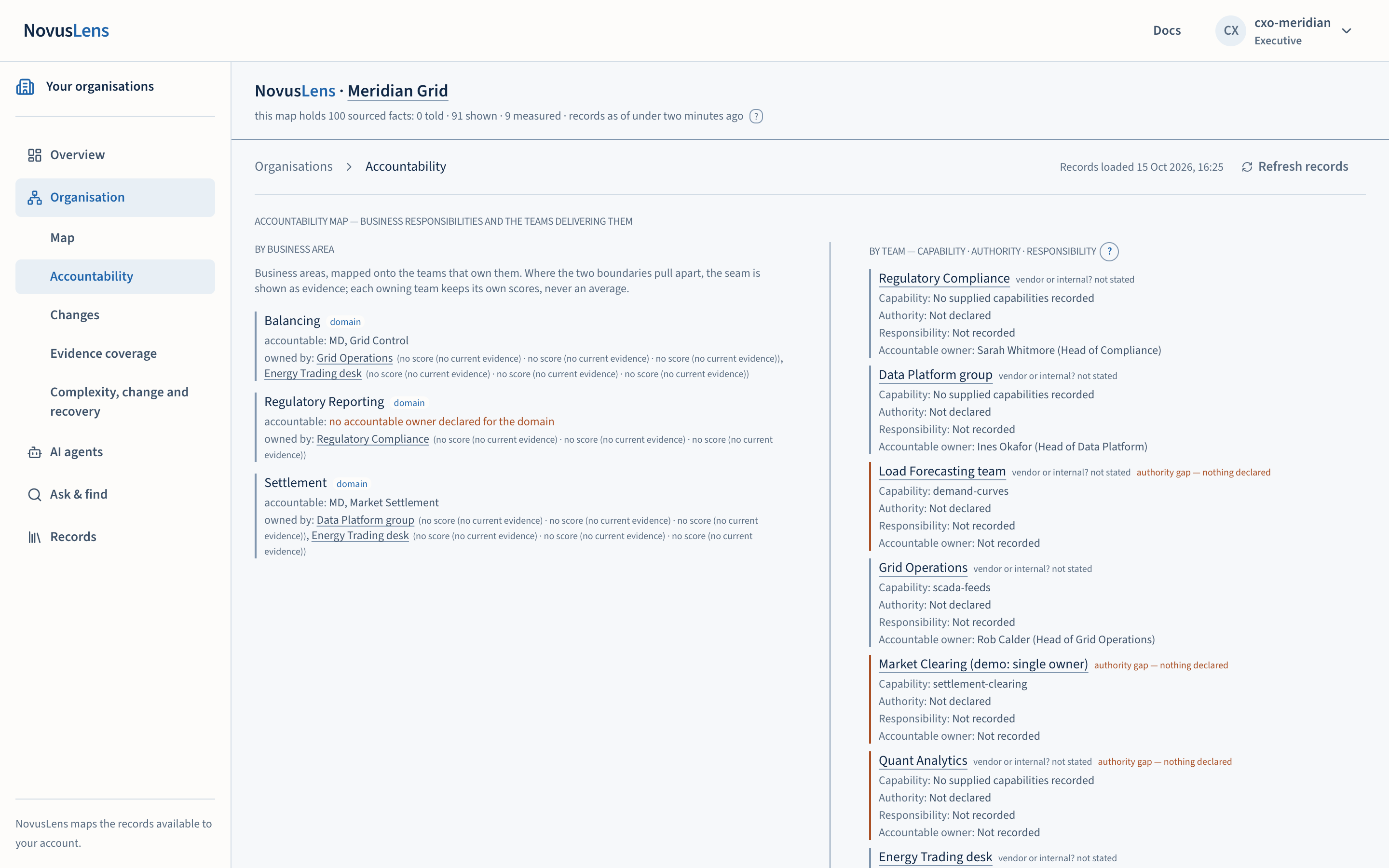
The left column, By business area, lists business areas and the teams that deliver them. For each area it shows the accountable owner recorded for the area, and the teams that own parts of it. Where the area has no accountable owner, the view says “no accountable owner declared for the domain”.
Business areas and teams can disagree in shape. The view shows differences between business areas and team structure. These include areas split across teams, teams serving several areas and areas with no owner. Each owning team keeps its own scores. The view does not average them.
2. Read the teams
The right column, By team — Capability · Authority · Responsibility, lists each team with its four answers. Select a team name to open it on the map. Its Summary shows the same answers and links to the supporting records.
Use the help link beside the heading to read how the three agentic terms are defined. Capability, Authority and Responsibility are always written out in full.
3. Recognise an authority gap
An internal team with neither recorded authority nor an accountable owner carries the label authority gap — nothing declared. The label appears in the team heading, and the box has an amber edge.
An authority gap is a gap in the record. It means that no source you have says what the team may do or who answers for it. It does not establish that nobody has authority, and it does not establish that the team is acting outside any authority. The next step is to check the team’s own records and ask the responsible owner to confirm, then have an authorised writer record the answer.
4. Check the scores and the sources
Business areas show the Complexity, Agility and RecoverabilityRecoverabilityThe R in C/A/R: how well a team or service restores acceptable service after a failure. Recovery times and tested alternatives can supply evidence. (C/A/RC/A/RThree separate scores for a team or service: Complexity, Agility and Recoverability. Each uses current evidence and the customer’s stated scoring rules.) scores of the teams that own them, each team separately. Where no current evidenceCurrent evidenceA view that uses only measurements recent enough to count. The “What we were told” view uses recorded statements instead. covers a score, the view says so in place of a number. The scores are calibrated indicators, and their meaning depends on the mapping that produced them. Open the team to see the sources beside each value.
What you will see
- Each team as a block, with a thin coloured edge. An amber edge marks an authority gap, or a fleet incidentFleet incidentA finding about several agents that completed the same operation above their recorded limits in one period. The agents must share something recorded in the model. that the team shares with other agents.
- Each answer on its own line, labelled. Blank answers say “Not declared” or “Not recorded” rather than leaving a space.
- Business areas with their accountable owner and the teams that own them.
- A note that this view shows what the records say. The map and evidence coverageCoverageWhat the available records cover, and what is missing. A count such as “3 of 5 dependencies measured” names the measured portion and the gap. also show measurements.
What it does not do
- A missing answer is not proof that nobody is responsible. It is a gap in the record.
- The view does not show a reporting line. A dependency is not a line of management.
- The view does not check that a named owner acts as owner.
When something goes wrong
- A team shows “Not recorded” but you know who answers for it. The fact is not in the records NovusLens holds for your role. Ask the operator who maintains the import whether it has been captured. Do not treat the blank as a decision.
- An authority gap appears on a team whose owner is named in a document. The owner may be recorded under another name, or the document may not have been imported. Open the team’s Evidence tab on the map to see which records were used.
- A business area lists teams you cannot see. Your role limits what you can open. Teams outside your view are not named.