Declared against observed, and where the record stops.
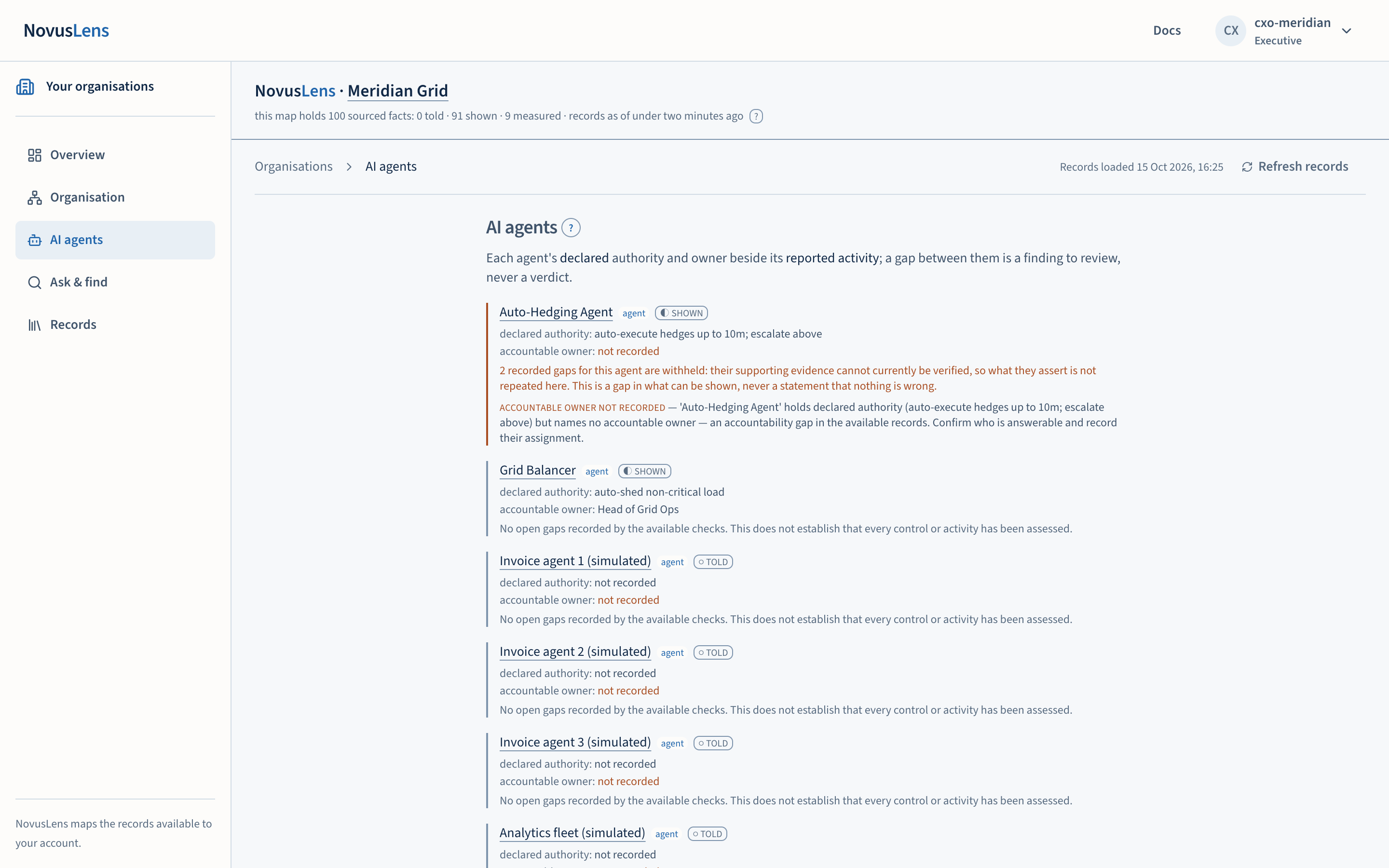
The AI agents destination lists each operational agent in the organisation’s mapMapThe view of teams, services and their dependencies for the selected part of the organisation. Details appear beside the map. beside its declared authority and its accountable ownerAccountable ownerThe person recorded as answerable for a team, service or agent. NovusLens does not assume that this person is also the one who runs it day to day.. Below the list sit panels for intervention evidence, the recorded remitRemitA written list of an agent’s allowed actions, resources and destinations for information. The list states whether it is complete. beside observed activity, and fleet incidentFleet incidentA finding about several agents that completed the same operation above their recorded limits in one period. The agents must share something recorded in the model. cards that group related cases. Each appears when its records exist. NovusLens reads these records and shows where they agree and where they do not. It does not run, stop or steer any agent.
What you will achieve
For each agent, you will read its declared capabilities and authority, its accountable owner and its recorded activity. You will read intervention cases and compare an agent’s remit with its activity. You can also draft a remit for the responsible person to approve.
Before you start
- An agent appears once its declaration has been imported and placed on the map. Until then the page says “no operational agents mapped yet”.
- An empty panel is not an all-clear. Read it as “no records here”.
- Three terms are used on this page. CapabilityCapabilityWhat a team can provide or an agent can do. NovusLens records the claim and the evidence that supports it. is what the agent can do, as it declares. AuthorityAuthorityWhat a team or agent is allowed to decide or do. For an agent, this comes from a named person or system that grants permission. is what it may do, from a recorded grant or remit. ResponsibilityResponsibilityThe work or result that a team or agent answers for. NovusLens records the person answerable for it. is who answers for the result, the accountable owner. These are kept apart throughout.
- Activity from a simulated estateSimulated estateA set of example agents supplied for testing and demonstrations. Their findings carry the label “(simulated estate)”. Real customer reports do not carry that label. is labelled simulated estate. Activity from preloaded demonstration telemetryTelemetryMeasurements and activity records sent by a running system, such as ticket timings, network traffic or workflow results. is labelled illustrative. Neither is customer evidence.
Declarations beside observations
Each agent shows two declared lines:
- declared authority, from the agent’s declaration, or “not recorded”;
- accountable owner, the named owner, or “not recorded” in amber.
Beside the agent’s name, a badge states how the declaration is known, on the evidence ladderEvidence ladderThe three levels of support a record can have, in order: told, shown and measured.: TOLD, SHOWN or MEASURED. A platform-signed declaration is shown as SHOWN. A declaration attested by an operator’s document is TOLD. See evidence and proof for what each rungRungOne of three levels of support for a recorded value: told, shown or measured. The level appears beside the value. means.
Gaps between what is declared and what the checks found appear beneath the agent as findingsFindingA difference in the records that needs a decision. It includes its sources and can describe a slow handoff, disputed fact or missing owner. to review. They are not verdicts. The gap labels, as they appear on screen, are:
- accountable owner not recorded
- activity absent from the declaration
- capability declaration unavailable
- declared control unmet
- Agent declaration (AgentFactsAgentFactsA signed statement from an agent about its allowed work, its permissions and the person answerable for it.) unverified
Some gaps are tagged illustrative or simulated estate, which tells you where their data came from.
The owner gap
An owner gap is a gap in the record. It says that no accountable owner is recorded for the agent. It does not say that the agent is acting wrongly, and it does not say who should be the owner.
Withheld gaps
Some recorded gaps cannot be shown because their supporting evidence cannot currently be verified. The page counts them, for example “2 recorded gaps for this agent are withheld”, and does not repeat what they assert. The page states that this is a gap in what can be shown, never a statement that nothing is wrong.
When no gap is open
The page says “No open gaps recorded by the available checks. This does not establish that every control or activity has been assessed.” Read it as the limit of the checks, not as a clean result.
Fleet incident cards
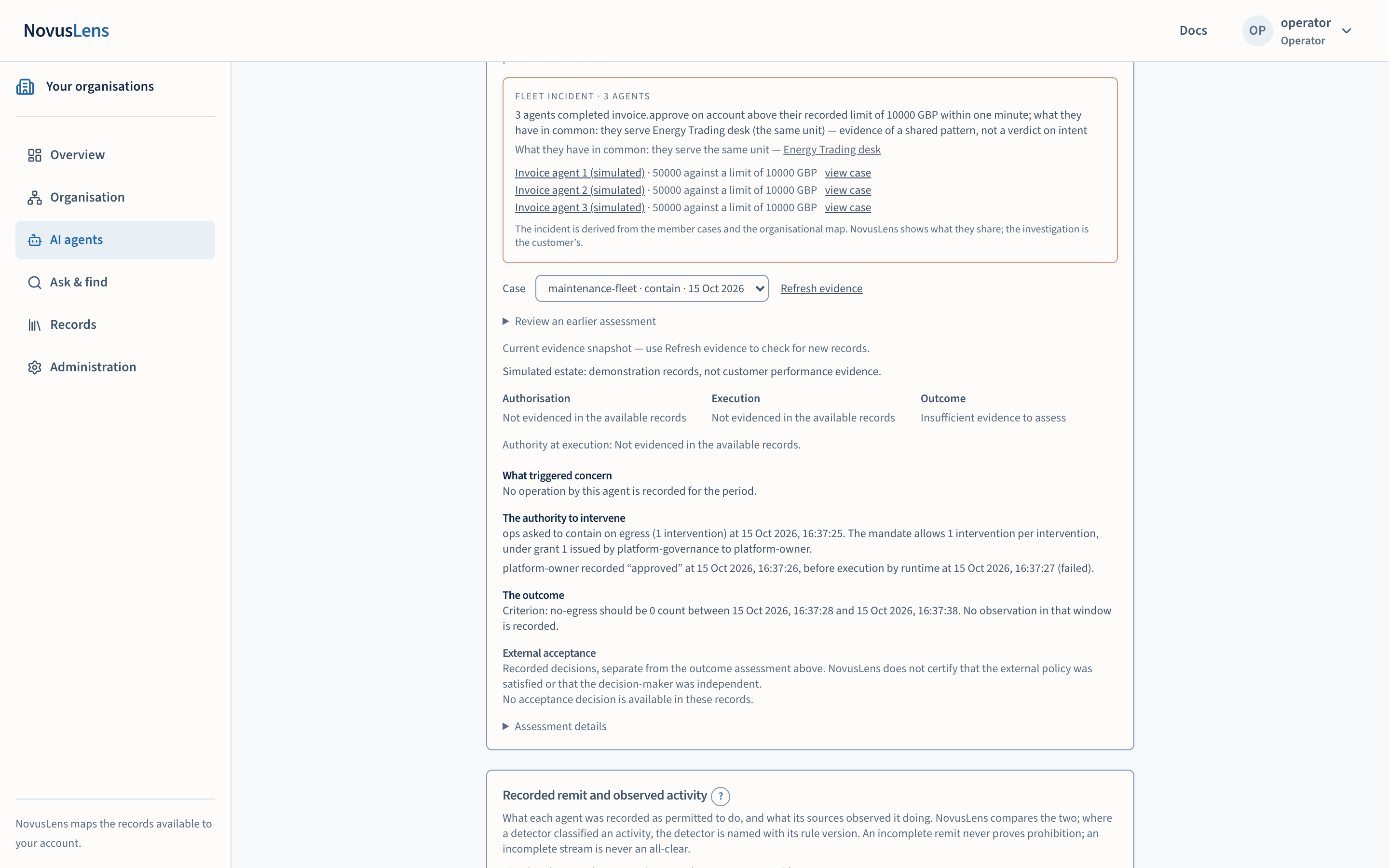
A fleet incident card groups agents that exceeded a per-operation limit for the same operation. The records must establish a shared unit, provider or grant. The card shows:
- how many agents are involved and what the operation was;
- what they share: a unit, a provider they depend on, or a grant they act under;
- each member, with its value against its limit, and a view case link for members that have a case.
An agent that crosses its limit several times is one agent’s case, not a fleetFleetA group of AI agents considered together. Related activity can be grouped only when the records establish what the agents share.. Agents with nothing in common stay as separate cases.
Intervention evidence
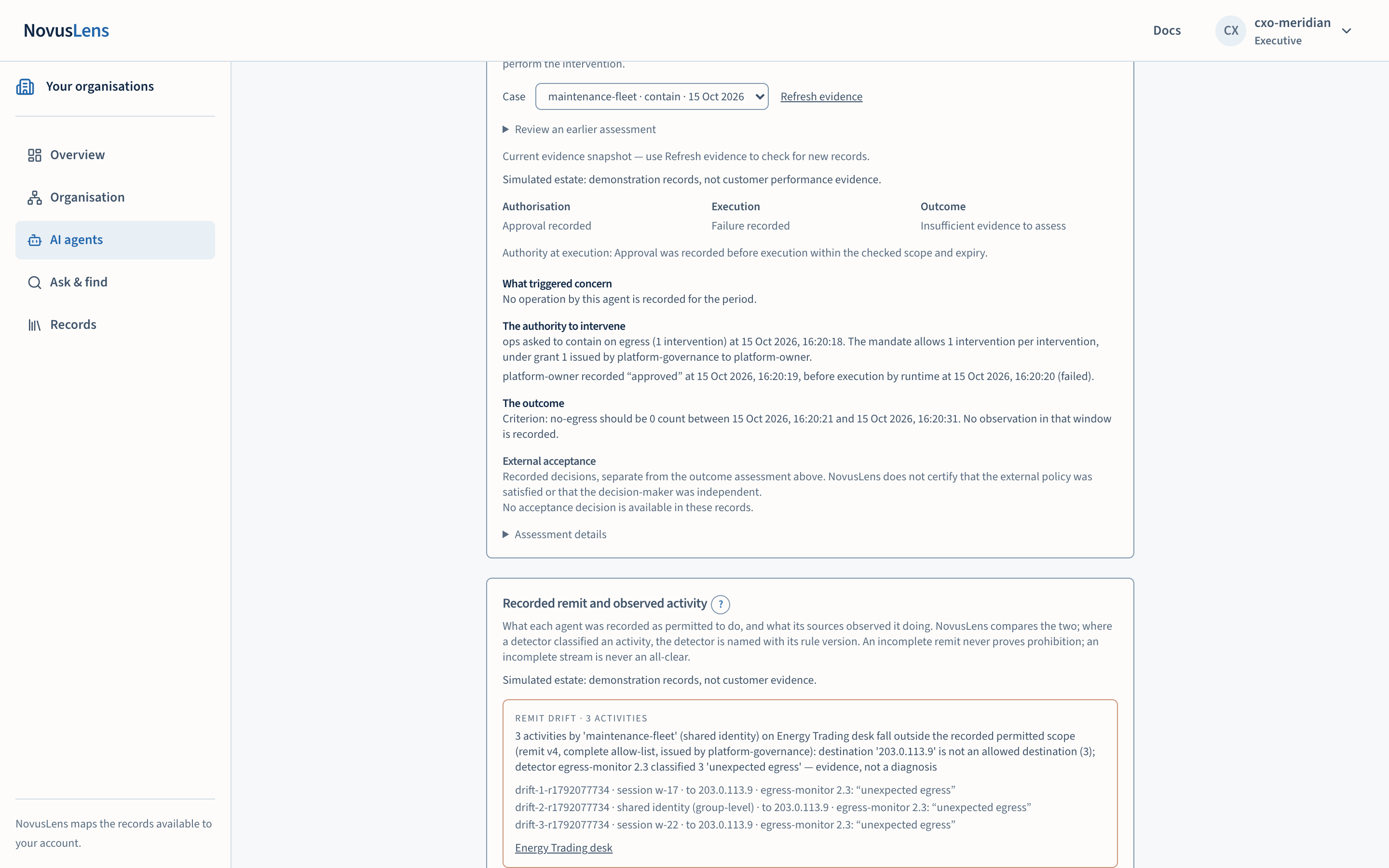
Intervention evidence shows what the external systems recorded about an intervention: the approval, the execution and the outcome. NovusLens displays these records. It does not perform the intervention.
- Choose a case from the Case list.
- Read the three results: Authorisation, Execution and Outcome. Each is worded as a record, for example “Approval recorded” or “Refusal was recorded before execution”.
- Read Authority at execution. It states whether approval was recorded before execution.
- Read the explanation beneath, in parts:
- What triggered concern compares each operation with its per-operation upper bound only.
- The authority to intervene sets out who was asked and who authorised, and when, relative to execution.
- The outcome states what was observed against the recorded criterion.
- Corrections, when a record was replaced or withdrawn. The original stays in the history.
- Read External acceptance. These are decisions recorded by the external party, shown separately from the outcome assessment.
- To see an earlier assessment, open Review an earlier assessment, choose a time, and select Show historical assessment. The result is labelled a historical reconstruction. Return to current evidenceCurrent evidenceA view that uses only measurements recent enough to count. The “What we were told” view uses recorded statements instead. brings back the current view, and Refresh evidence checks for new records.
Recorded remit and observed activity
A remit is the written scopeScopeThe work, data, activity or access that a rule, statement or calculation covers. For access, it names the records an account can see. For team measures, “Own operations” covers the selected unit. “Including descendants” adds the units beneath it. for an agent: the operations, resources and destinations its issuer declared. The panel names the remit’s issuer and status, and whether it is a complete allow-listAllow-listA list of permitted actions, resources or destinations. It excludes everything else only when its issuer says the list is complete. or a partial inventoryPartial inventoryA list that records some permitted actions, resources or destinations. Missing items do not establish that those items are forbidden.. It lists allowed and excluded operations, resources and destinations beside a table of observed activity.
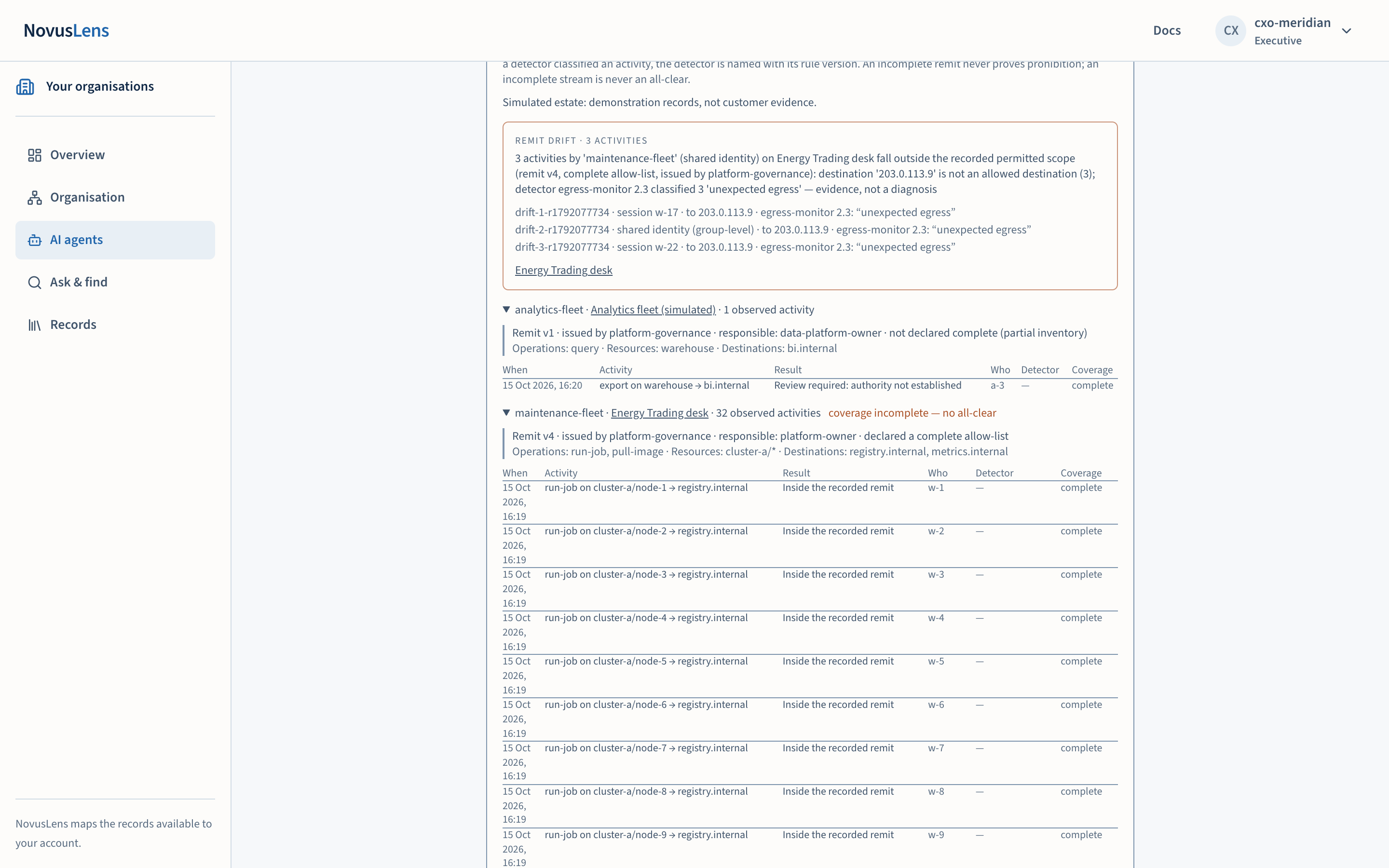
Each observed activity gets one of these results:
- Inside the recorded remit. The activity fits the parts of the remit that could be checked.
- Outside the recorded remit. The activity breaks an explicit exclusion, or falls outside a list declared complete. The page names what failed.
- Review required: authority not established. No usable remit applies, or an incomplete list cannot settle the question.
- Recorded remits overlap; not resolved. Two remits claim the same activity.
- Cannot be stated. A check needs a field the source did not record. The page names the field. This is not an all-clear.
An incomplete remit cannot prove that an activity was forbidden. An incomplete observation stream is never an all-clear. Where the stream is incomplete, the panel shows “coverageCoverageWhat the available records cover, and what is missing. A count such as “3 of 5 dependencies measured” names the measured portion and the gap. incomplete — no all-clear” beside the agent.
Where a detector classified an activity, the panel names the detector and its rule version.
Some activities carry a refusal note:
- refused and reported blocked: the resource reports that it stopped the attempt. The page counts it as an attempt, not as drift.
- refused, execution unresolved: it counts until the resource reports that it was blocked.
- refused at the resource yet recorded as completed: the page marks this as an enforcement gap in the runtimeRuntimeThe software that runs a model or agent. A model runtime answers model requests; an agent runtime carries out the customer's agent actions.’s own records.
Generated, deployment reported and enforcement observed
The remit panel keeps three statements apart. They are not the same claim.
- Export generated (a statement, not an on-screen label). A CedarCedarA language for writing rules about who may perform an action on a resource. NovusLens can generate files in this format for the customer to review. or RegoRegoA language for writing rules that a control system can check. NovusLens can generate files in this format for the customer to review. policy was produced from an approved declaration. It is labelled an engine-checked draft, not evaluated in your runtime. It is generated, not deployed.
- Deployment reported. The runtime sent a report naming the policy revision it says it activated. This is the runtime’s account of what it did. It is not proof that every route is controlled.
- Enforcement observed (a statement; the page shows it as per-activity notes). An activity record carries the runtime’s own decision, execution and effect. Only that record shows enforcement, and it is shown as the runtime gave it.
Declare a remit
A responsible person can write an agent’s remit in the product, rather than waiting for it to arrive from a source. The Declare a remit panel is shown to people who may draft. The steps are:
- The writer selects Declare a remit and fills in the agent, the purpose, the responsible role and the authority basis, with an optional backing document.
- The writer lists the allowed operations, resources and destinations, and any excluded ones. Tick This is a complete allow-list for the agent only if the list is complete.
- Select Save draft.
- The responsible person selects Approve on the draft. Approval makes two checks: the person must be an enrolled remit issuer, and must own the agent’s cellCellA box on the map that stands for a team, service, supplier or AI agent. It is a unit you can inspect, not necessarily a department or a person. (its box on the map) or be the accountable executive. The operator can approve only on that person’s recorded behalf, using the On behalf of field.
- When approved, the declaration is recorded and labelled declared in product, with the author and the approver. A refusal appears as “Not approved:” followed by the reasons.
To write a fleet remit, tick A fleet template. The template names its members and carries one body.
Approved declarations offer Export Cedar and Export Rego, and Withdraw.
The same panel holds a business-activity catalogue, which maps each business activity to the operations, resources and destinations that count as that activity.
What the pages do not establish
- A missed target does not establish excessive autonomy. An owner gap is a gap in the record.
- No open gap from the available checks does not mean every control or activity has been assessed.
- A remit can be complete or partial. A partial remit cannot prove that an activity was forbidden.
- A deployment report is the runtime’s account. It is not evidence that every route is controlled.
- Humans decide what follows from any of these records.
When something goes wrong
- Records unavailable. The remit panel shows “Remit records are unavailable.” with a Retry button. Intervention evidence shows “Intervention records are unavailable.” Retry, or refresh the page.
- Evidence still being projected. The remit panel says “Evidence is still being projected; activities are withheld until it lands.” Wait, then refresh.
- No historical reconstruction. The page says there is no reconstruction for the chosen time. Choose a later time, or return to current evidence.
- A declaration is refused. The refusal is an answer in words. It is not an access error, and it names what failed.
- A simulated or unestablished environment. The panel says “Simulated estate: demonstration records, not customer performance evidence.” or “The source environment has not been established.” Treat the records accordingly.