A record to take into the room, with its sources attached.
The management brief is the Overview written as a document. It lists selected items, open differences in the records and each item’s limits. A group can then discuss them from the same page. It is a record for discussion. It is not a recommendation to reorganise, and it is not a statement of financial benefit.
What you will achieve
By the end of this page you will be able to:
- open the management brief for one organisation;
- check the date and the scopeScopeThe work, data, activity or access that a rule, statement or calculation covers. For access, it names the records an account can see. For team measures, “Own operations” covers the selected unit. “Including descendants” adds the units beneath it. of the records it covers before you share it;
- print it, or save it as a PDFPDFPortable Document Format: a file format that preserves a document’s page layout for reading, sharing and printing., from the browser;
- download it as an HTMLHTMLHypertext Markup Language: the format used to describe a web page's content and structure. file;
- read each item’s owner, source, coverageCoverageWhat the available records cover, and what is missing. A count such as “3 of 5 dependencies measured” names the measured portion and the gap. and uncertainty before you rely on it.
HTML (Hypertext Markup Language) is the format of a web page. PDF (Portable Document Format) keeps a document’s page layout for sharing or printing.
Before you start
Sign in and choose an organisation. Select Records, then Management brief beneath it in the navigation. The address for the page carries the organisation, so opening the brief for another organisation means choosing that organisation first. If the page is opened without an organisation, NovusLens returns you to your list of organisations.
Open Account menu to check your role. The brief covers the records your account can see. Each brief uses the records available to the account preparing it. Two accounts can therefore receive different briefs.
Steps
- Select Records, then Management brief.
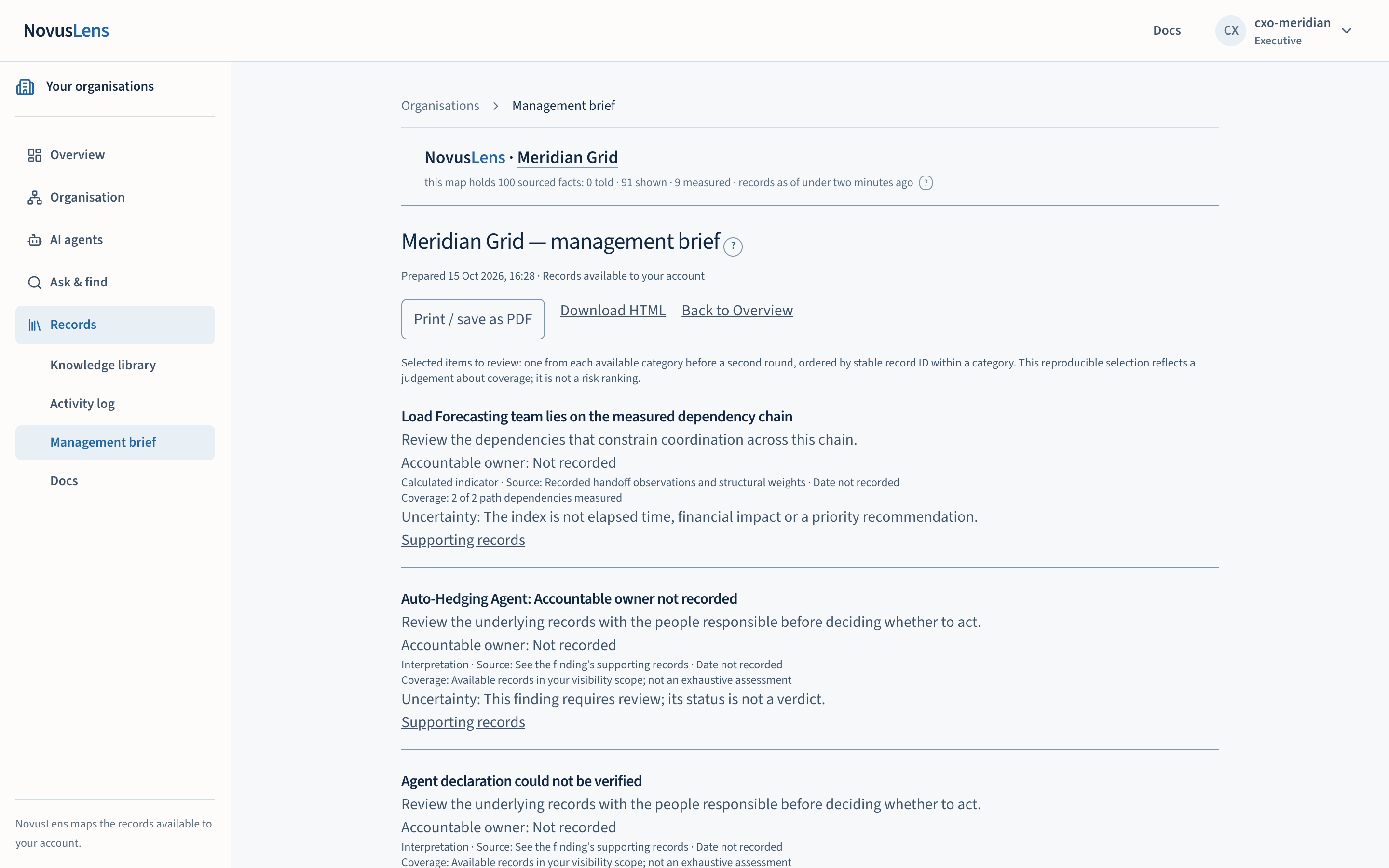
- Read the line under the title. It gives the time the brief was prepared and says that the records shown are those available to your account.
- Read the selection note. The items are chosen one from each available category, in a fixed order. The note says that this is a repeatable selection based on which records are available. It is not a ranking of risk.
- Read each item. Check the accountable ownerAccountable ownerThe person recorded as answerable for a team, service or agent. NovusLens does not assume that this person is also the one who runs it day to day., the source and its observation date, the coverage and the uncertainty line before you discuss the item.
- To check an item in detail, select Supporting records under it. The records open in the usual way, and you see only what your account may see.
- Scroll to Differences to review. Each line is an open difference, with its status. Select a line to open it in the Overview.
- Choose one of the controls at the top:
- Print / save as PDF opens the browser print dialogue for this page. The navigation is hidden in print.
- Download HTML saves the brief as a file named after the organisation, ending in
-management-brief.html. - Back to Overview returns you to the Overview.
What you will see
Each item in the brief has the same lines:
- a title and a short line on why it is worth review;
- Accountable owner, which reads “Not recorded” when no name is recorded in the records. That is a gap in the record, not a findingFindingA difference in the records that needs a decision. It includes its sources and can describe a slow handoff, disputed fact or missing owner. that no owner exists;
- the basis of the item, its source and its observation date. Where the source gives no date, the brief says “date not recorded”;
- Coverage, which says where records exist for the item;
- Uncertainty, which says what the item does not establish.
The brief ends with the list of differences to review and a note on the dependency-chain index. The page is dated by when it was prepared, so a printed copy is a snapshot. It does not update.
What it does not do
- It does not rank the organisation’s risks. The selection is a judgement about coverage.
- It does not recommend a reorganisation or a change of owner.
- It does not give a recipient access to the records. Its source links work only for a person with current access to them.
- It does not record the reasons behind a difference. It records what the sources show.
When something goes wrong
- You are sent to your list of organisations. The address had no organisation in it. Choose the organisation first, then open Management brief.
- The download says “Organisation required”. The download address was opened without an organisation. Open the brief from the page, not from a bare address.
- The download says “Sign in first”. Your session has ended. Sign in again and repeat the download.
- The download says “Access refused”. The account cannot see the organisation’s records. Ask your administrator for access.
- An item says “Not recorded” for its owner. Nothing in the records names one. Take the item to the team that answers for it, or see the activity log to check who has recorded changes recently.
Each download is recorded in the activity log, where it appears as “Management brief generated for download”. Printing from the browser is not recorded by NovusLens.